

LinkedIn Pages
Look up the LinkedIn Pages connector settings for organization IDs, endpoints for page, follower and share statistics or posts, sync dates and load type.
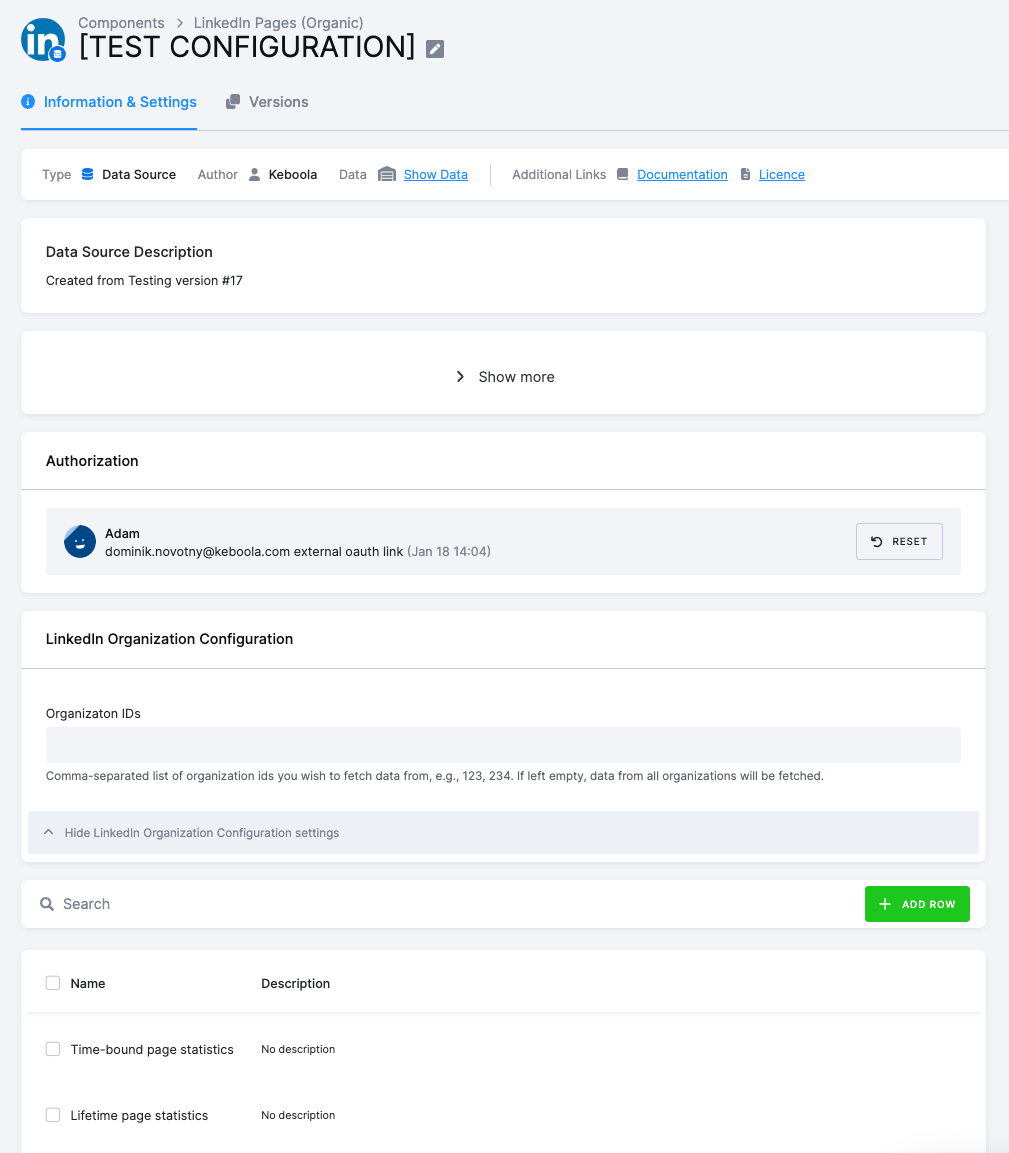
This data source connector downloads data from the LinkedIn Pages API (opens in a new tab) related to organizations, their posts, and statistics about performance of their pages, as well as tables of enumerated types used therein.
Configuration
Section titled “Configuration”Create a new configuration of the LinkedIn Pages connector.
Global Configuration
Section titled “Global Configuration”To configure this connector, you need to authenticate with a LinkedIn Profile using OAuth. More info on this topic can be found in LinkedIn API Documentation (opens in a new tab).
- Organization IDs (organizations) - [OPT] Comma-separated list of organization IDs you wish to fetch data from, e.g., 123, 234. If left empty, data from all organizations will be fetched.
Row Configuration
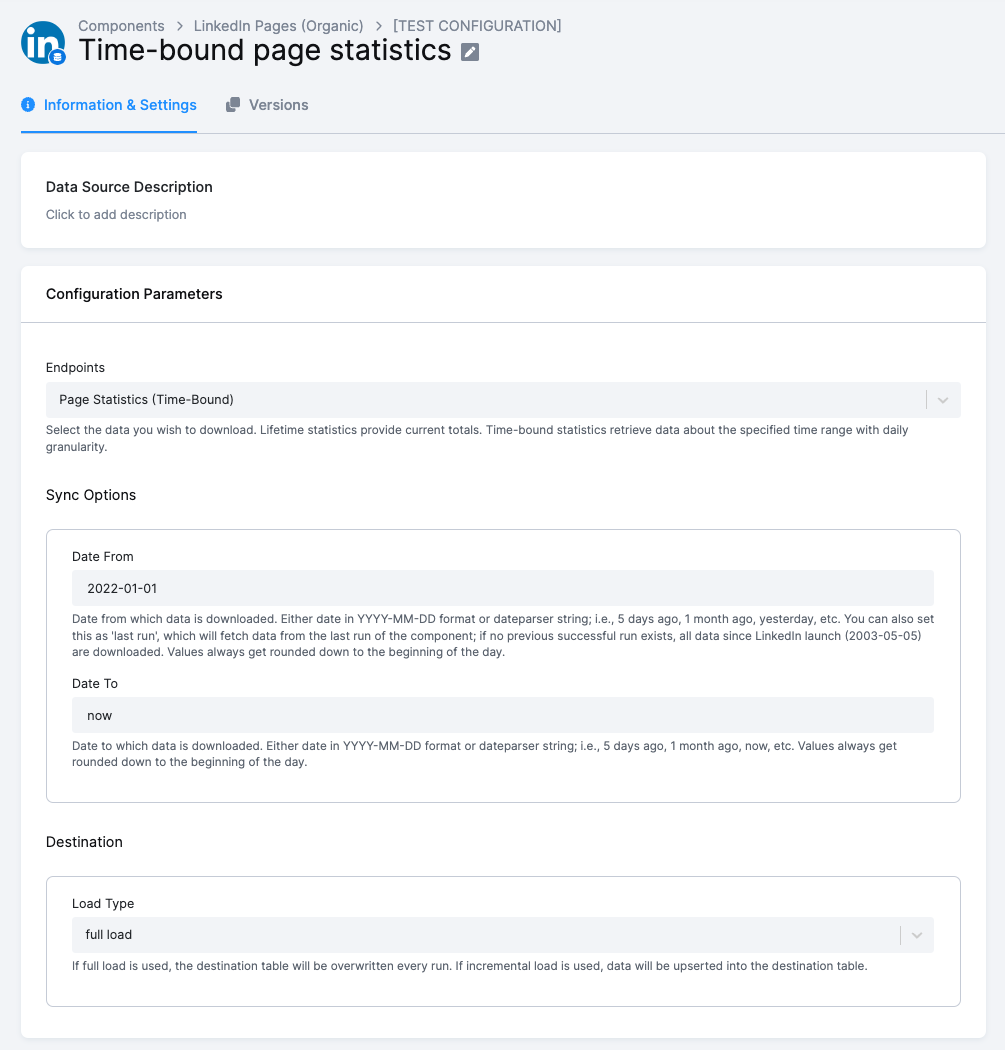
Section titled “Row Configuration”- Endpoints (endpoints) - [REQ] Select the data you wish to download. Lifetime statistics provide current totals. Time-bound statistics retrieve data about the specified time range with daily granularity. This must be one of these:
- Page Statistics (Time-Bound) to download time-bound Organization Page Statistics (opens in a new tab). The time range is determined by Sync Options (see below).
- Page Statistics (Lifetime) to download lifetime Organization Page Statistics (opens in a new tab).
- Follower Statistics (Time-Bound) to download time-bound Organization Follower Statistics (opens in a new tab). The time range is determined by Sync Options (see below).
- Follower Statistics (Lifetime) to download lifetime Organization Follower Statistics (opens in a new tab).
- Share Statistics (Time-Bound) to download time-bound Organization Share Statistics (opens in a new tab). The time range is determined by Sync Options (see below).
- Share Statistics (Lifetime) to download lifetime Organization Share Statistics (opens in a new tab).
- Posts to download data about posts, their comments, and their likes.
- Enumerated Types to download tables of enumerated types used in other data tables.
- Organizations to download data about organizations themselves.
- Download Post Statistics (post_statistics) - [OPT] Only for Posts. Also downloads the statistics of each post into the table
post_statistics, as a snapshot dated by the day of the run. Off by default. See Post Statistics below. - Sync Options (sync_options) [REQ] - Options pertaining to only time-bound data extraction:
- Date From (date_from) - [REQ] Date from which data is downloaded. Either date in
YYYY-MM-DDformat or dateparser string; i.e.,5 days ago,1 month ago,yesterday, etc. You can also set this aslast run, which will fetch data from the last run of the component; if no previous successful run exists, all data since LinkedIn launch (2003-05-05) are downloaded. Values always get rounded down to the beginning of the day. - Date To (date_to) - [REQ] Date to which data is downloaded. Either date in
YYYY-MM-DDformat or dateparser string; i.e.,5 days ago,1 week ago,now, etc. Values always get rounded down to the beginning of the day.
- Date From (date_from) - [REQ] Date from which data is downloaded. Either date in
- Destination (destination) - [REQ] Options specifying how to save extracted data into Keboola Storage:
- Load Type (load_type) - [REQ] If full load is used, the destination table will be overwritten every run. If incremental load is used, data will be upserted into the destination table.
Configuration example:
Post Statistics
Section titled “Post Statistics”When Download Post Statistics is enabled, the Posts row also downloads the share statistics (opens in a new tab) of each post into the table post_statistics. The table contains these columns:
post_urn- the post ID, the same asidin thepoststablesnapshot_date- the day of the run (UTC)impressionCount- impressionsuniqueImpressionsCount- unique impressions (members reached)clickCount,likeCount,commentCount,shareCount- clicks, reactions, comments and repostsengagement- the engagement rate: (clicks + reactions + comments + reposts) / impressions
LinkedIn provides only current totals for each post, not daily values. Each run therefore saves a snapshot of those totals, dated by the day of the run. The primary key is post_urn and snapshot_date. With incremental load, the snapshots build a history, and the daily change for a post is the difference between two consecutive snapshots. Running the row more than once on the same day overwrites that day’s snapshot. The history starts on the day the option is first enabled; earlier days cannot be filled in.
Notes on the values:
likeCount,commentCountandshareCountare lifetime totals.impressionCount,uniqueImpressionsCountandclickCountcover a rolling window of roughly the last 12 months. For posts older than that, they count only the recent activity and can decrease between snapshots.- The “engagements” count shown in LinkedIn analytics is the sum
clickCount + likeCount + commentCount + shareCount. - Only organic activity is included; sponsored activity is not counted.
- Posts without any activity in the 12-month window are not returned.
Was this page helpful?
Thank you for helping improve Keboola's documentation!