

Artifacts Tutorial
Produce and consume artifacts from a Python transformation step by step, using curl against the Storage API.
This tutorial will show you how to work with artifacts. In the following example we will use Python Transformation component to produce and consume artifacts. But these principles would work inside any component.
In the examples, we use the curl console tool to interact with our APIs.
Examples
Section titled “Examples”For each example we will need Storage API Token to make the API call.
-
Obtain a Storage API token from the user interface of your project, see this Guide.
-
Store the token and url to the environment variable.
Terminal window export STORAGE_API_HOST="https://connection.keboola.com"export TOKEN="..."Use the connection host of your stack.
1. Produce artifact
Section titled “1. Produce artifact”This is very simple example. We will just create a Python Transformation, which will write a file to the artifacts “upload” folder. This file will be then uploaded as “artifact” to File Storage.
-
In your Keboola project, create a new Python transformation, and paste this code into it:
import oswith open("/data/artifacts/out/current/myartifact1", "w") as file:file.write("this is my artifact file content")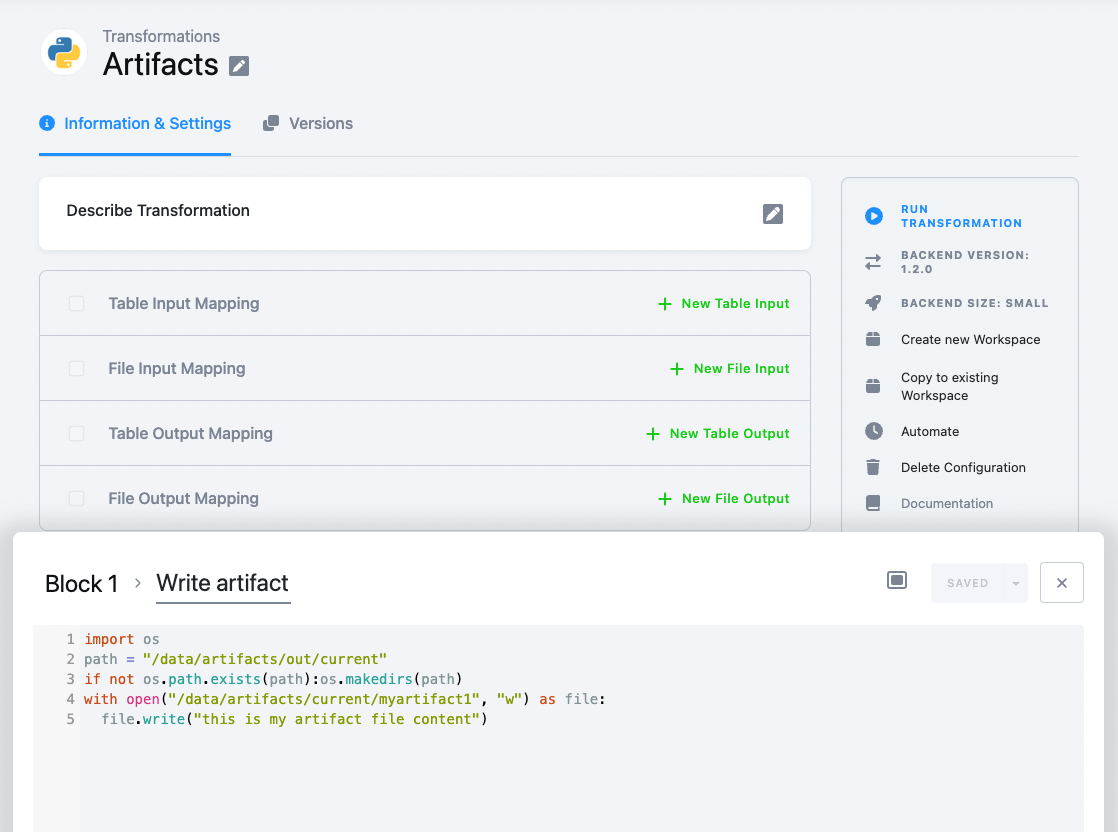
-
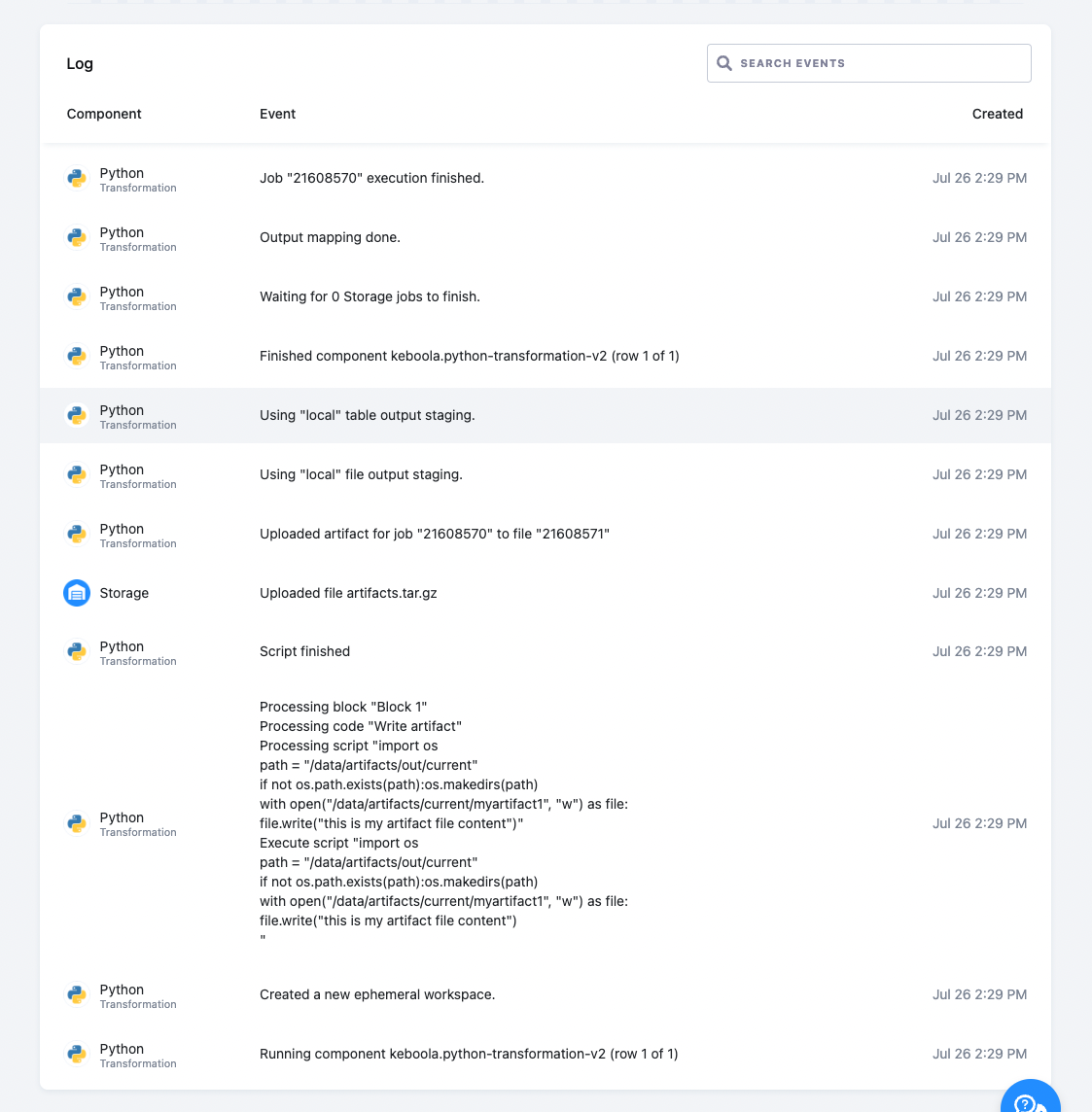
Run the transformation - it should upload the file to File Storage as “artifact”
-
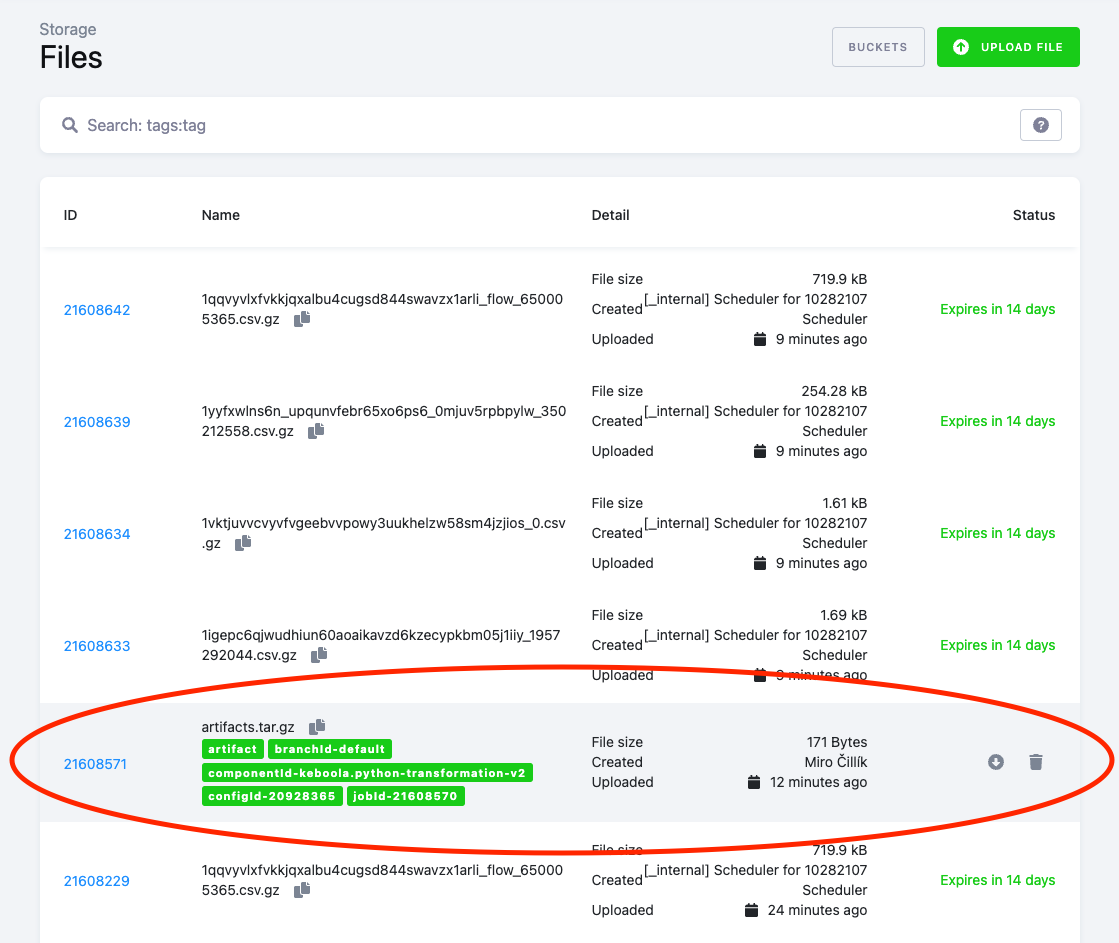
The file is now visible in File Storage with appropriate tags
2. Produce & consume artifacts
Section titled “2. Produce & consume artifacts”To consume (download) artifacts for component to work with, we need to enable and configure artifacts download in the configuration of a component.
We will create another configuration of the Python transformation via API.
The artifacts part of the configuration will look like this.
It will enable download of artifacts of type runs with limit 5, which means this will download artifacts created by the last 5 runs of the same component configuration
{ "artifacts":{ "runs":{ "enabled":true, "filter":{ "limit":5 } } }}The script of the transformation will look like following.
Files read from /data/artifacts/in/runs/*/* will be displayed at output - these are the artifact files downloaded.
The script will also generate a new artifact and write it to /data/artifacts/out/current/myartifact1 as in previous example.
import osimport glob
# Downloadprint(glob.glob("/data/artifacts/in/runs/*/*"))
# Uploadwith open("/data/artifacts/out/current/myartifact1", "w") as file: file.write("value1")-
Run this curl command to create the configuration:
Terminal window curl -X POST "$STORAGE_API_HOST/v2/storage/branch/default/components/keboola.python-transformation-v2/configs" \-H "X-StorageApi-Token: $TOKEN" \-H 'Content-Type: application/x-www-form-urlencoded' \--data-urlencode 'configuration={"parameters":{"blocks":[{"name":"Block 1","codes":[{"name":"artifacts","script":["import os\nimport glob\n\n# Download\nprint(glob.glob(\"/data/artifacts/in/runs/*/*\")) \n\n# Upload\nwith open(\"/data/artifacts/out/current/myartifact1\", \"w\") as file:\n file.write(\"value1\")"]}]}]},"artifacts":{"runs":{"enabled":true,"filter":{"limit":5}}}}' \--data-urlencode 'name=Artifacts upload & download' \--data-urlencode 'description=Test Artifacts upload & download' -
Run the configuration (in the UI, or through the Jobs API) and open its job log. The first run prints
[]: there are no previous runs to download from yet. Run it again and the log lists/data/artifacts/in/runs/jobId-<first job id>/myartifact1.
3. Consume artifacts from different component
Section titled “3. Consume artifacts from different component”Similar to previous example we will create a configuration of Python Transformation component.
But this time we will download artifacts produced by the configuration from Example 2.
-
Export the id of the previously created configuration into an environment variable:
Terminal window export CONFIG_ID="..." -
Run curl command
Terminal window curl -X POST "$STORAGE_API_HOST/v2/storage/branch/default/components/keboola.python-transformation-v2/configs" \-H "X-StorageApi-Token: $TOKEN" \-H 'Content-Type: application/x-www-form-urlencoded' \--data-urlencode 'configuration={"parameters":{"blocks":[{"name":"Block 1","codes":[{"name":"artifacts","script":["import os\nimport glob\n\n# Download\nprint(glob.glob(\"/data/artifacts/in/custom/*/*\"))"]}]}]},"artifacts":{"custom":{"enabled":true,"filter":{"component_id":"keboola.python-transformation-v2","config_id":"'"$CONFIG_ID"'","branch_id":"default","limit":5}}}}' \--data-urlencode 'name=Artifacts upload & download' \--data-urlencode 'description=Test Artifacts upload & download' -
Run the consumer configuration and open its job log: it lists the producer’s artifact under
/data/artifacts/in/custom/jobId-<producer job id>/.
The whole configuration now looks like this (with the numeric ID you exported in place of 1234567):
{ "parameters": { "blocks": [ { "name": "Block 1", "codes": [ { "name": "artifacts", "script": [ "import os\nimport glob\n\n# Download\nprint(glob.glob(\"/data/artifacts/in/custom/*/*\"))" ] } ] } ] }, "artifacts": { "custom": { "enabled": true, "filter": { "component_id": "keboola.python-transformation-v2", "config_id": "1234567", "branch_id": "default", "limit": 5 } } } }4. Shared artifacts
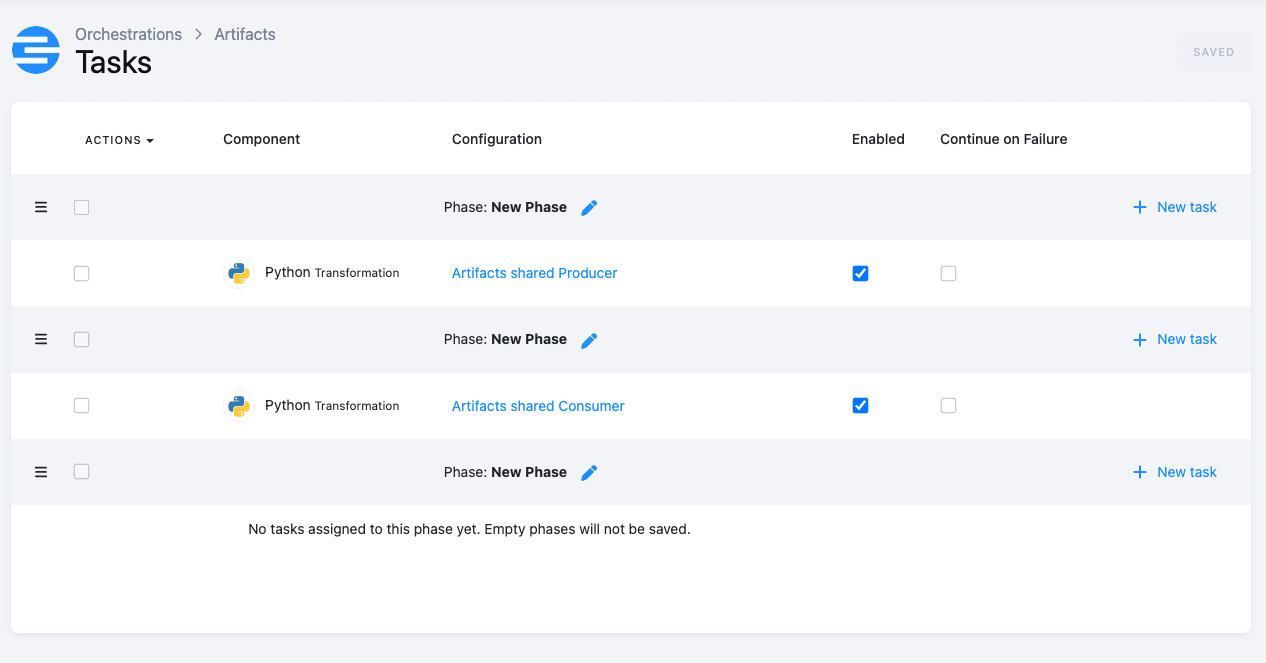
Section titled “4. Shared artifacts”This example will show how to share artifacts within an orchestration We will create two configurations of Python Transformation component. One will produce a shared artifact and the other will consume it. Both configurations needs to be in the same orchestration. The configuration producing artifact needs to be in a phase that precedes the consuming one.
-
Create “Producer” configuration The Python code will write a file into a shared folder:
import ospath = "/data/artifacts/out/shared"with open(path + "/myartifact3", "w") as file:file.write("value1")Run curl command to create the configuration:
Terminal window curl -X POST "$STORAGE_API_HOST/v2/storage/branch/default/components/keboola.python-transformation-v2/configs" \-H "X-StorageApi-Token: $TOKEN" \-H 'Content-Type: application/x-www-form-urlencoded' \--data-urlencode 'configuration={"parameters":{"blocks":[{"name":"Block 1","codes":[{"name":"Upload shared","script":["import os\npath = \"/data/artifacts/out/shared\"\nwith open(path+\"/myartifact3\", \"w\") as file:\n file.write(\"value1\")"]}]}]},"artifacts":{"runs":{"enabled":true,"filter":{"limit":5}}}}' \--data-urlencode 'name=Artifacts shared Producer' \--data-urlencode 'description=Artifacts upload shared' -
Create “Consumer” configuration
The artifacts configuration:
{"artifacts": {"shared": {"enabled": true}}}The Python script:
import osimport globprint(glob.glob("/data/artifacts/in/shared/*/*"))Run curl command to create the configuration:
Terminal window curl -X POST "$STORAGE_API_HOST/v2/storage/branch/default/components/keboola.python-transformation-v2/configs" \-H "X-StorageApi-Token: $TOKEN" \-H 'Content-Type: application/x-www-form-urlencoded' \--data-urlencode 'configuration={"parameters":{"blocks":[{"name":"Block 1","codes":[{"name":"Download shared","script":["import os\nimport glob\n\nprint(glob.glob(\"/data/artifacts/in/shared/*/*\")) "]}]}]},"artifacts":{"shared":{"enabled":true}}}' \--data-urlencode 'name=Artifacts shared Consumer' \--data-urlencode 'description=Artifacts download shared' -
Now put each of the configurations into a Legacy Flow (orchestration): “Artifacts shared Producer” into phase 1 and “Artifacts shared Consumer” into phase 2.
-
Run it. The consumer’s job log lists
/data/artifacts/in/shared/jobId-<producer job id>/myartifact3.
Was this page helpful?
Thank you for helping improve Keboola's documentation!