

Check Storage and Jobs
What should be in Storage and Jobs once the pipeline runs, how to read a flow run, and the failures that actually happen.
Everything you built leaves a trace in two places: Storage holds the tables, Jobs holds every run that produced them. This page says what should be there, and what to do when it is not.
Before you start
Where you are the pipeline has run at least once, by hand or on its schedule.
When you finish you know it works, or which step to look at.
What you should have
Section titled “What you should have”| What you built | What it does | Where it lives |
|---|---|---|
| Two HTTP configurations | bring the five files and the live forecast into the project | Components |
| SQL transformation | joins five of the six tables into staffing_outlook | Transformations |
| App, if your project has Apps | the grid | Apps |
| Flow | runs the loads and the transformation, in order, every Monday morning | Conditional Flows |
In Storage: two in.c- buckets named after the connector and the configuration ID
(keboola-ex-http-…), and one out.c-Boolabean-staffing-outlook bucket.
To have Kai list it for you, with what each part does:
List everything the Getting Started guide created in this project (the Boolabean configurations, tables, the app and the flow) and what each does.It only reads, so it asks for no approval by default.
The one number that proves the join
Section titled “The one number that proves the join”staffing_outlook should hold exactly 42 rows: six cafés times the seven days in the forecast.
- More than 42: an input has duplicate rows, such as the forecast loaded twice with incremental
load on, or a café listed twice in
stores. The joins cannot multiply rows on their own. - Fewer: a join dropped rows, such as a
location_idthat did not map onto astore_id, or a forecast with fewer than seven days. - Ten columns, and
short_handedtrue on a few rows in a warm week, never on all of them. A week under 18 °C flags none (see below).
Which columns may be empty, and which may not
Open the table’s Data Sample and check the columns the right way round. store_name, city,
date, weekday, the two forecast columns and rostered_staff are filled on every row; they
come from straight lookups. expected_units and expected_units_per_person can be empty on a
row, and that is not an error: the summer never had a day in that café’s weather band.
Transform data says which band, and why
a cold week flags nobody, in its fold The ten columns, upper-case names, and empty cells.
So the failure signals are the extremes: a lookup column empty on any row means a join matched
nothing, and expected_units empty on every row means the two band expressions in the SQL no
longer match each other.
Reading a flow run
Section titled “Reading a flow run”The flow’s All Runs tab lists every run: who or what started it (your name, or
Schedule for <flow ID> Scheduler for a scheduled run), duration and status. Expand a run to see its phases;
the Conditions rows marked Matched between them are the flow moving on to the next phase.
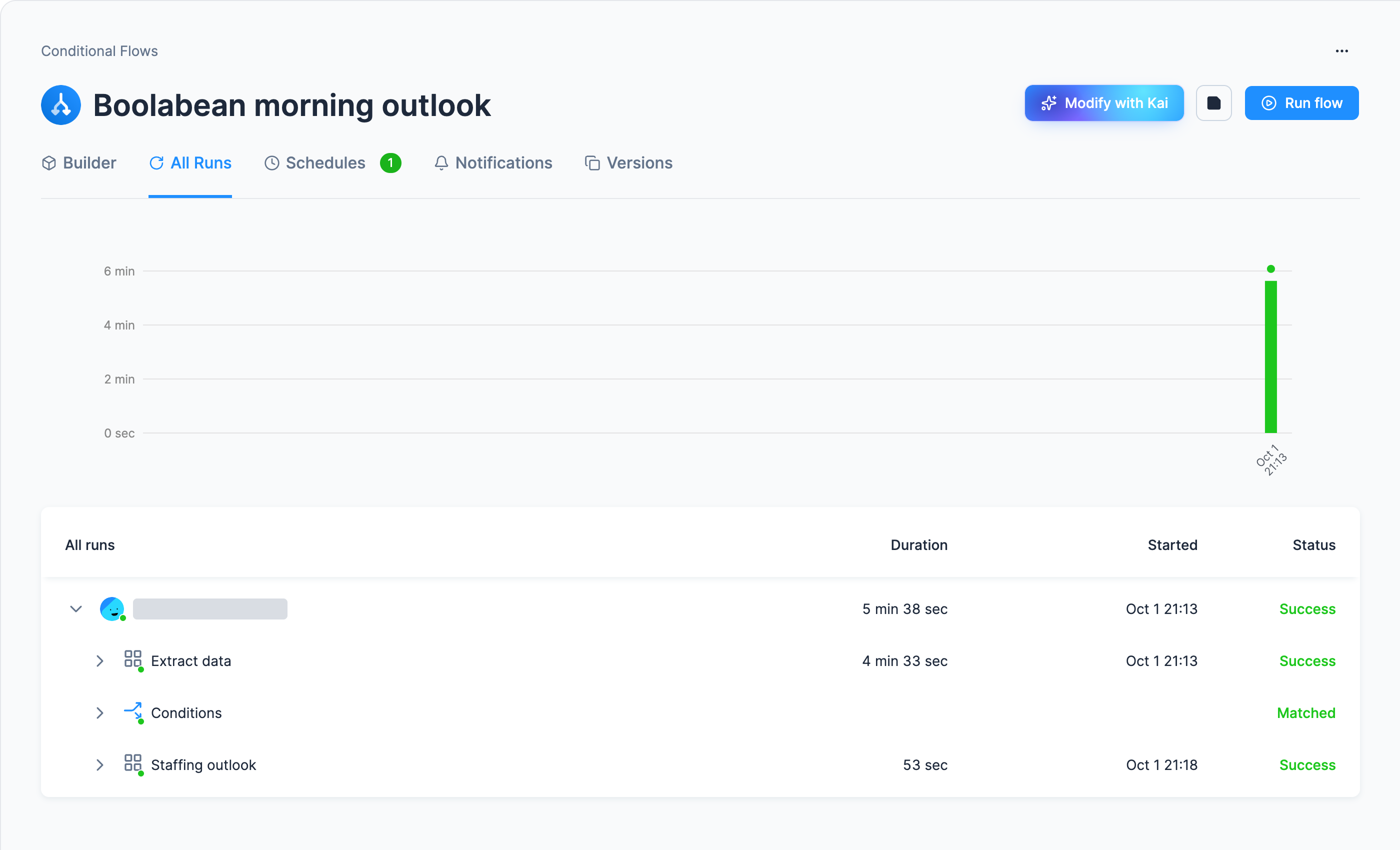
- Success is the goal: a few minutes end to end. Ours, in a Free Plan project, took 5 min 38 s: 4 min 33 s for the loads, about two minutes of which the jobs waited in the queue, and 53 seconds for the transformation.
- Error is not all lost. Phases run in order, so the earlier ones finished and their tables are updated: if the transformation fails, the loads have still brought in the new forecast.
- More jobs than tasks is normal: one per task, a Conditional Flows phase job per phase, a Conditional Flows job for the run, and one per row for a row-based connector (six lines for the five-file configuration).
The same checks from a terminal
Section titled “The same checks from a terminal”Every number above has a read-only command behind it, which is the fastest way to answer “did
Monday’s run work?” without opening the project. They need
kbagent connected to your project. docs-demo below is a project alias,
substitute yours:
kbagent job list --project docs-demo --component-id keboola.flow --limit 5kbagent job detail --project docs-demo --job-id <job-id>kbagent storage tables --project docs-demo --bucket-id out.c-Boolabean-staffing-outlookRecent runs with status and duration; one run, including which task failed; and the row count that proves the join. None of them changes anything.
The failures that actually happen
Section titled “The failures that actually happen”The transformation fails inside the flow, but works on its own
Its phase is running before the loads finish. Check that both connectors sit in an earlier phase, not the same one.
Every task succeeds, but the grid is unchanged
Reload the page first: a tab opened before Monday’s run still shows last week. The flow does not
restart the app, so after that the app shows the new table if it reads staffing_outlook when
someone opens it, as ours does, or once it has slept and started again. If yours read the table
only when it started and was kept awake, click Edit with Kai on the app’s page, ask Kai to make
it read the table on every request, and click Publish to Production so the live app gets the
change. If the grid still shows last week, check that the transformation is in the flow: without
it the run rebuilds nothing.
The forecast table has 42 rows, but the outlook has more
Duplicate input rows: see the one number above.
The scheduled run never happens
The schedule’s toggle is off, the flow is disabled, or the project has used up its runtime minutes.
Jobs queue instead of running
A short wait before the jobs start needs no fix: ours waited about two minutes with two tasks in the phase. If the wait grows with every task you add, split the phase: ten concurrent component jobs is the recommended ceiling, and Support can adjust a project’s limits.
Failures specific to one step stay on its page: loading on Load data into Storage, SQL and mapping on Transform data, and apps on Build an app. Failures of the spreadsheet delivery are on the Send a table to Google Sheets side trip.
Was this page helpful?
Thank you for helping improve Keboola's documentation!