

Explore your data
Put the question to your own data: Kai reads the table you built and answers it in plain words, then answers the follow-up.
You built the table to answer something, and nobody has said the answer out loud yet. This page does, out of your own project.
Before you start
Where you are staffing_outlook is in Storage.
When you finish the guide’s question answered from your data, and a second answer you did not have to build anything new to get.
You need
- A Keboola project. No project yet? Create or join a project.
The
staffing_outlooktable in Storage, from Transform data.
What each tab needs
- Prompt tab Kai, the Kai Agent button in the top bar, on supported stacks. A new Free Plan project has it from the start; elsewhere an organization admin turns it on once: Get started with Kai.
- UI tab a workspace loaded with
staffing_outlook, where you run the SQL below. - CLI / API tab kbagent, connected through
kbagent project addwith an admin (master) token.
Prompt, UI and CLI / API: three ways to do the same task, not three steps. Pick one tab below; later pages open on it.
Most of it can be undone: if a step builds something else, say so in the same chat.
Reading is different from building
Section titled “Reading is different from building”- Here Kai reads what you built instead of building for you. Querying a table and calculating a metric is Data Exploration, and it needs nothing set up.
- Nothing on this page changes the project. Kai’s read-only tools run without asking by default, so expect an answer, not an approval card, unless this project’s tool permissions are set to ask.
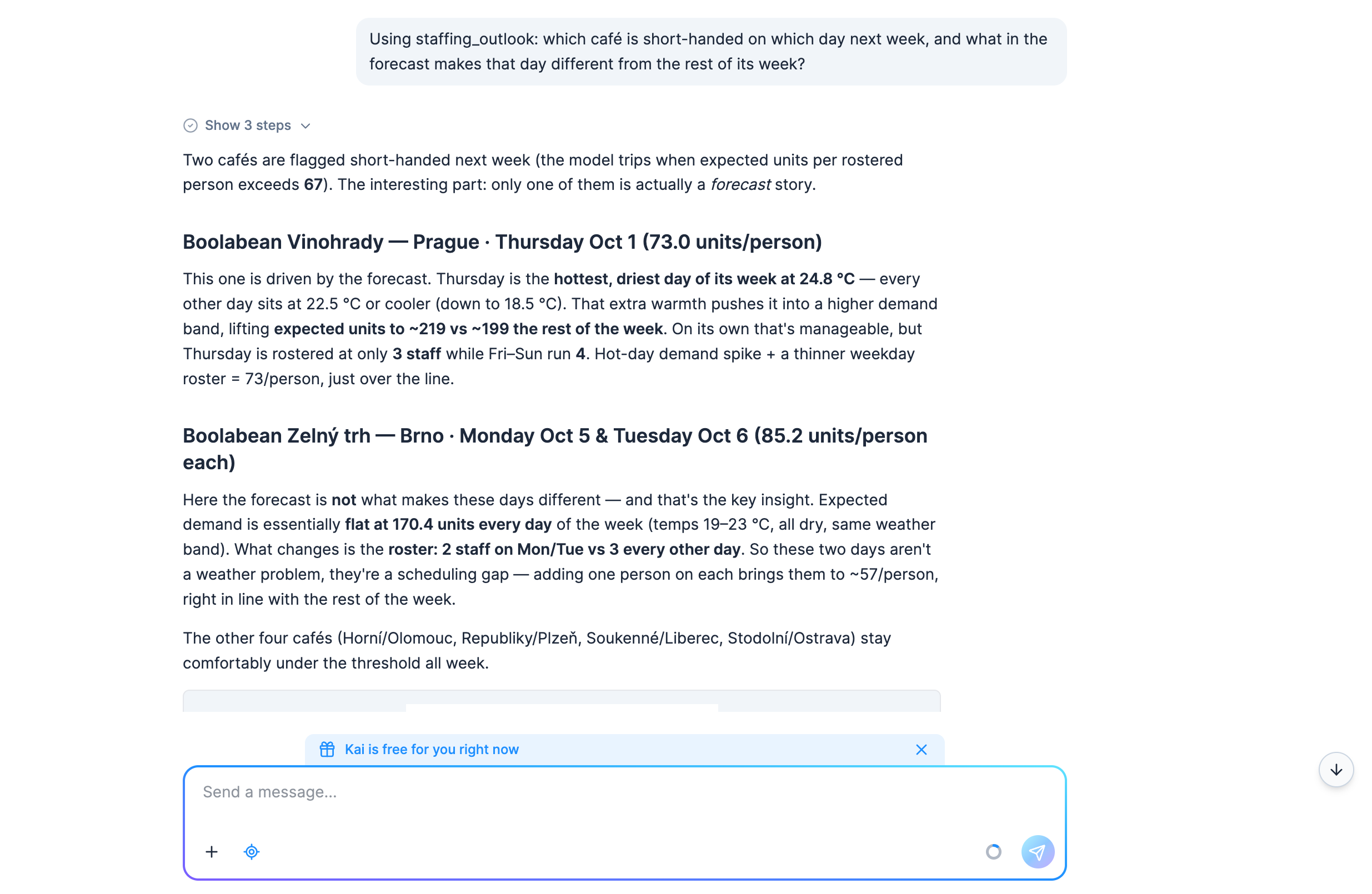
The question and Kai’s answer in a Free Plan project, in the week the screenshots in this guide come from:
Weather data by Open-Meteo.com (CC BY 4.0).
Ask it
Section titled “Ask it”The same table answers what-if questions too:
Using staffing_outlook: if one extra person joined the roster on every short-handed day, which of those days would still be over 67 expected units per person, and what would each day's figure become?Check: Kai recomputes the per-person figure for every flagged row with one more person and lists the before and after. In a week with nothing flagged there is nothing to recompute.
What Kai answered on the day this was written
The answer changes with the forecast. In the week of the screenshots, 1 to 7 October 2026, three café-days were flagged: Vinohrady on Thursday, its warmest day, and Zelný trh on Monday and Tuesday, where Kai noticed that the forecast was much like its other days’ and the roster was two people instead of three, “a roster fix, not a forecast surprise”.
The follow-up’s answer that week was none of them: one extra person brought the three days to 54.8, 56.8 and 56.8 expected units per person. That is the kind of thing nobody can see in five separate files, and it took one question because the pipeline had already put the roster next to the demand.
If the numbers come out different
Kai wrote its own SQL and may have drawn the lines somewhere else: rounded before dividing, or read
short_handed as text. The definitions this guide uses are the columns your transformation
already wrote, so point Kai at those (expected_units, rostered_staff,
expected_units_per_person) rather than re-prompting blind. To see where its lines are, ask in the
same chat:
Show me the SQL you ran for that answer and the rows it is based on.It only reads, so by default it asks for no approval, and a wrong filter or a wrong table is easier to spot in the SQL than in the prose.
There is no dialog for “answer this question”. Reading a table by hand means querying it. Open a workspace on the same table and run the SQL yourself, in your project’s dialect.
If your project uses Snowflake
SELECT "store_name", "city", "date", "weekday", "expected_units", "rostered_staff", "expected_units_per_person"FROM "staffing_outlook"WHERE "short_handed" = TRUEORDER BY "expected_units_per_person" DESC;The follow-up is the same query with one more person on the roster:
SELECT "store_name", "date", ROUND("expected_units" / ("rostered_staff" + 1), 1) AS "with_one_more"FROM "staffing_outlook"WHERE "short_handed" = TRUEORDER BY "with_one_more" DESC;If those raise invalid identifier, your table has upper-case column names: Snowflake upper-cases
an alias that was not quoted, and the Prompt path’s Kai does not quote them. Either drop the
quotes from the query or upper-case the names inside them. The
transform page explains why the two cases exist.
If your project uses BigQuery
BigQuery reads double quotes as text rather than as names, so the same two queries go without
them, with date in backticks as on the transform page:
SELECT store_name, city, `date`, weekday, expected_units, rostered_staff, expected_units_per_personFROM staffing_outlookWHERE short_handed = TRUEORDER BY expected_units_per_person DESC;SELECT store_name, `date`, ROUND(expected_units / (rostered_staff + 1), 1) AS with_one_moreFROM staffing_outlookWHERE short_handed = TRUEORDER BY with_one_more DESC;Storage’s own Data Sample tab answers the simpler half without a workspace at all: open
staffing_outlook, sort by expected_units_per_person descending, and read the top rows.
kbagent kai ask puts the same question from a terminal and prints the answer, tables and all. It
is one shot: no chat to keep, nothing created. It needs kbagent connected through
kbagent project add with an admin (master) token; a connection made with kbagent auth login
does not reach Kai.
kbagent kai ask --project docs-demo -m "Using out.c-Boolabean-staffing-outlook.staffing_outlook, which cafe and day has the highest expected units per person, and how many rows are flagged short_handed?"Name the table by its full Storage ID rather than the short name the transformation used: the short name only exists inside a transformation’s input mapping.
For a conversation rather than a single question, kbagent kai chat -m "…" returns a chat ID and
--chat-id continues it.
Check: the answer names a café and a day: the top row of staffing_outlook sorted by
expected_units_per_person, descending. The top can be a tie: days in the same weather band with
the same roster get the same figure, and any of the tied days is right. If you would rather have
the numbers than the prose,
kbagent storage table-detail --project docs-demo --table-id out.c-Boolabean-staffing-outlook.staffing_outlook
gives you the shape of the table and
a workspace gives you the SQL.
A chat answer reaches only the person who asked. The next page turns the table into a grid anyone can open.
Was this page helpful?
Thank you for helping improve Keboola's documentation!