

Load data into Storage
Load five CSV files and a live weather forecast into Keboola Storage with the HTTP data source connector, straight from their URLs.
Data arrives split across files that cannot answer a question on their own; the next page joins them.
Before you start
Where you are a project with empty Storage.
When you finish six tables in Storage and two connector configurations you can re-run.
You need
- A Keboola project. No project yet? Create or join a project.
What each tab needs
- Prompt tab Kai, the Kai Agent button in the top bar, on supported stacks. A new Free Plan project has it from the start; elsewhere an organization admin turns it on once: Get started with Kai.
- UI tab a browser.
- CLI / API tab kbagent, connected to your project with write access; for the raw requests, your stack’s host and a Storage API token.
Prompt, UI and CLI / API: three ways to do the same task, not three steps. Pick one tab below; later pages open on it.
In the chat, Kai asks before each change it makes (how approvals work), and most of it can be undone: if a step builds something else, say so in the same chat.
The sample data
Section titled “The sample data”A fictional café chain, Boolabean: invented sales and rosters, the real weather of summer 2026 in each café’s city, and a real forecast, fetched live. Each table is half a story.
-
stores6 rows six cafés in six Czech cities -
products18 rows the menu -
sales9,761 rows one summer of sales -
staffing552 rows the roster for every café and day -
weather_daily552 rows the real weather in each café's city, from Open-Meteo -
forecast42 rows next week for all six cafés, live from Open-Meteo, no account or key
Weather data by Open-Meteo.com, under
CC BY 4.0. weather_daily is Open-Meteo’s
historical daily maximum temperature and precipitation for June to August 2026, reshaped into one
row per café and day with our column names; forecast comes from its forecast API when you load it.
What the forecast URL asks for
Open-Meteo needs no account and no key. One request returns the next seven days for all six cafés at once, as CSV:
https://api.open-meteo.com/v1/forecast?latitude=50.0755,49.1928,49.8352,49.7475,49.5938,50.7663&longitude=14.4426,16.6083,18.2833,13.3776,17.2509,15.0562&daily=temperature_2m_max,precipitation_sum&timezone=Europe%2FPrague&format=csvThe six coordinate pairs are the cafés in store_id order, so location_id 0 in the answer is
S01 and 5 is S06. The connector has to be told about the file’s shape: seven lines of metadata
about the locations and a blank line come before the real header row. Skip those lines and the
forecast is 42 rows: seven days for six cafés.
How loading works
Section titled “How loading works”- A file at a URL
- The HTTP connector: one configuration, a row per file
- A table in Storage
- Data source connectors fetch data into Storage tables, on demand or on a schedule. There are hundreds of them, and all of them end in a table.
- HTTP downloads CSV files from a URL, and can be re-run, scheduled and put in a flow, which Build and schedule a weekly flow depends on.
- Two configurations: the five files share one, a row each. The forecast gets its own: it lives on another host, and the flow refreshes it every week.
Set it up
Section titled “Set it up”Setting up a data source connector is one of the things Kai does (Integration Setup). Open Kai Agent in the top bar and ask for the whole first configuration at once:
Load these five CSV files into Storage as one HTTP data source configuration called "Boolabean sales", one configuration row per file, each table named after its file:
https://help.keboola.com/getting-started/boolabean/stores.csvhttps://help.keboola.com/getting-started/boolabean/products.csvhttps://help.keboola.com/getting-started/boolabean/sales.csvhttps://help.keboola.com/getting-started/boolabean/staffing.csvhttps://help.keboola.com/getting-started/boolabean/weather_daily.csv
Run it, then tell me the row count of each of the five tables.
Expect seven approvals: the configuration, one per row, and the run. Kai reads each file’s header itself, so the tables get the files’ column names. After the run approval Kai says the job is running and hands the chat back; it returns with the counts on its own when the job ends, about six minutes later in a Free Plan project.
Check: Kai reports five tables with 6, 18, 9,761, 552 and 552 rows, and the configuration it links in the chat lists five entries under Rows. Then, in the same chat, the forecast:
Add a second HTTP data source configuration called "Boolabean forecast" that loads this one URL into a table called forecast:
https://api.open-meteo.com/v1/forecast?latitude=50.0755,49.1928,49.8352,49.7475,49.5938,50.7663&longitude=14.4426,16.6083,18.2833,13.3776,17.2509,15.0562&daily=temperature_2m_max,precipitation_sum&timezone=Europe%2FPrague&format=csv
It is open-meteo's CSV export: seven lines of metadata, a blank line, then the header row, then 42 data rows. Load only the data rows and name the columns location_id, time, temperature_2m_max and precipitation_sum. Run it, then tell me how many rows the forecast table has.
Expect three approvals for the forecast. Kai skips the nine leading lines and names the four columns as asked,
rather than keeping the header’s temperature_2m_max (°C).
The chat keeps what Kai made as links, so that is where to find it afterwards:
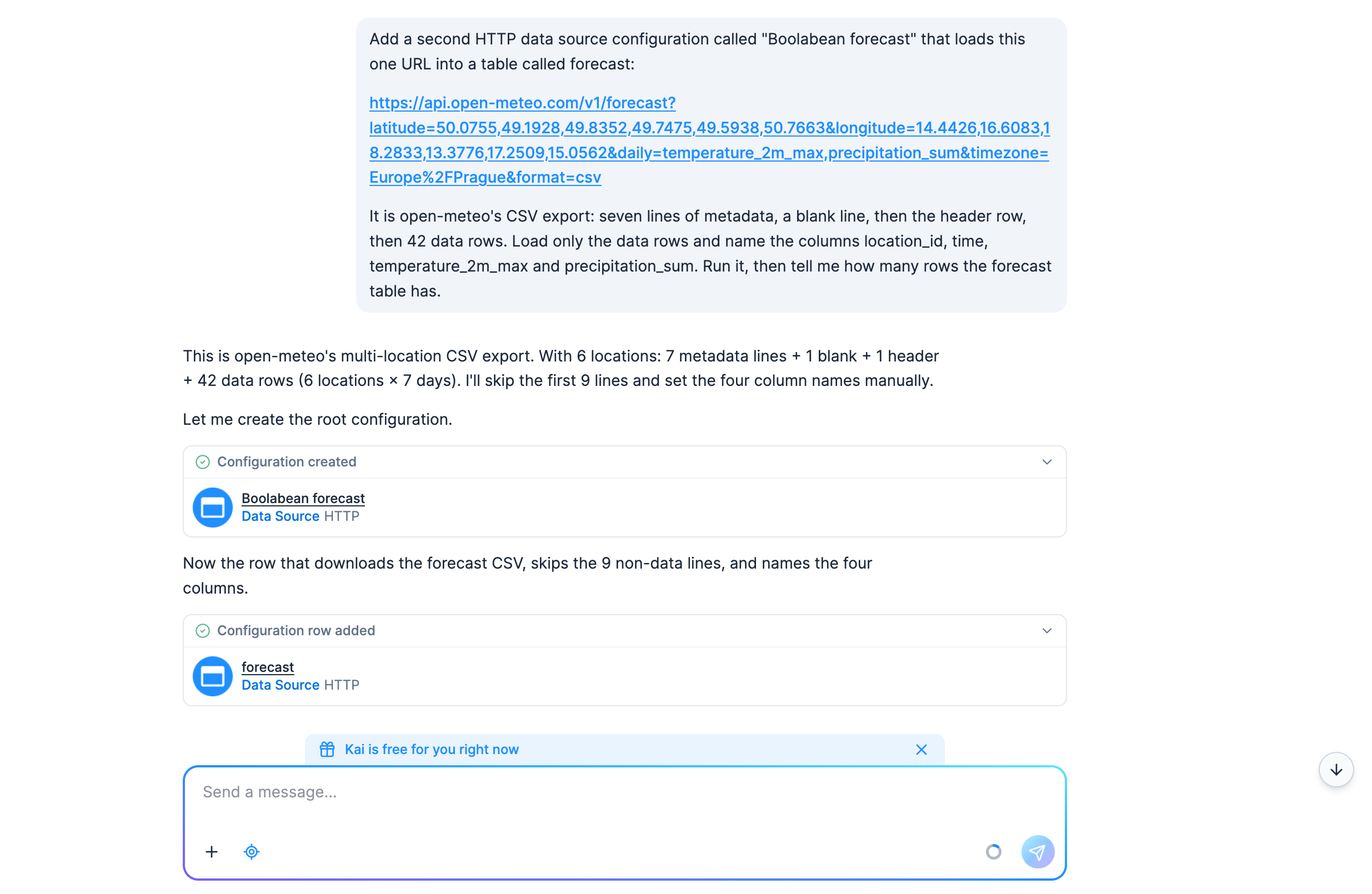
Check: a forecast table with 42 rows and the columns location_id, time,
temperature_2m_max and precipitation_sum. If Kai built something else, say so in the same chat,
or delete the configuration and use the UI tab, which also shows where a configuration and its
rows live.
To see what Kai built, ask in the same chat:
Explain the "Boolabean sales" configuration you created, row by row.It only reads, so it asks for no approval by default.
Create the configuration
-
Open Components and search for
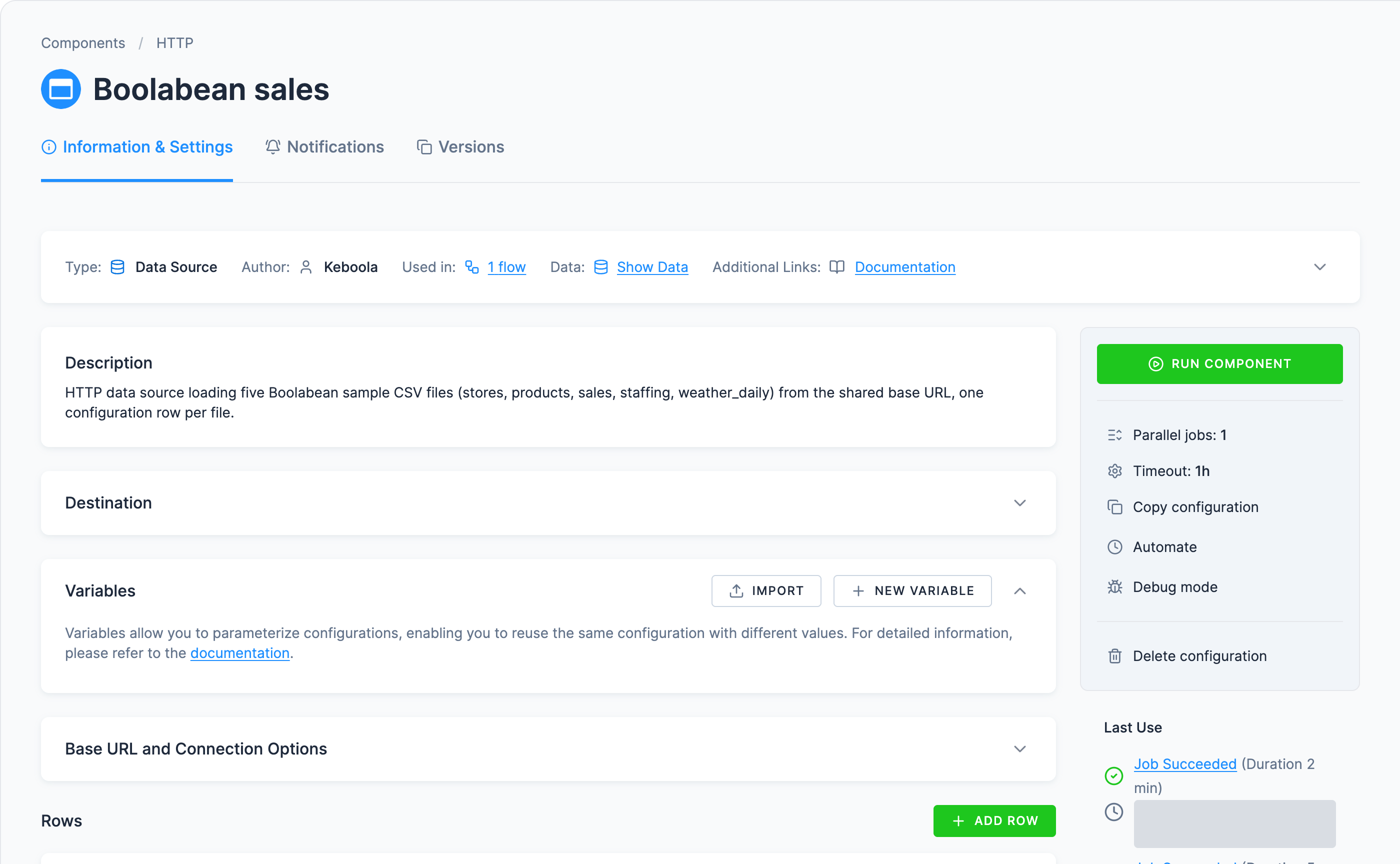
HTTP. Pick the plain HTTP (Data Source), the one described as Downloading CSV files from any HTTP, and HTTPS URL, and click Add Component (the card says Create Configuration instead once the component already has configurations in the project). The other match, HTTP Advanced (Beta), is a different component. Newer connectors with HTTP in the name may also appear; go by that description rather than by position in the list.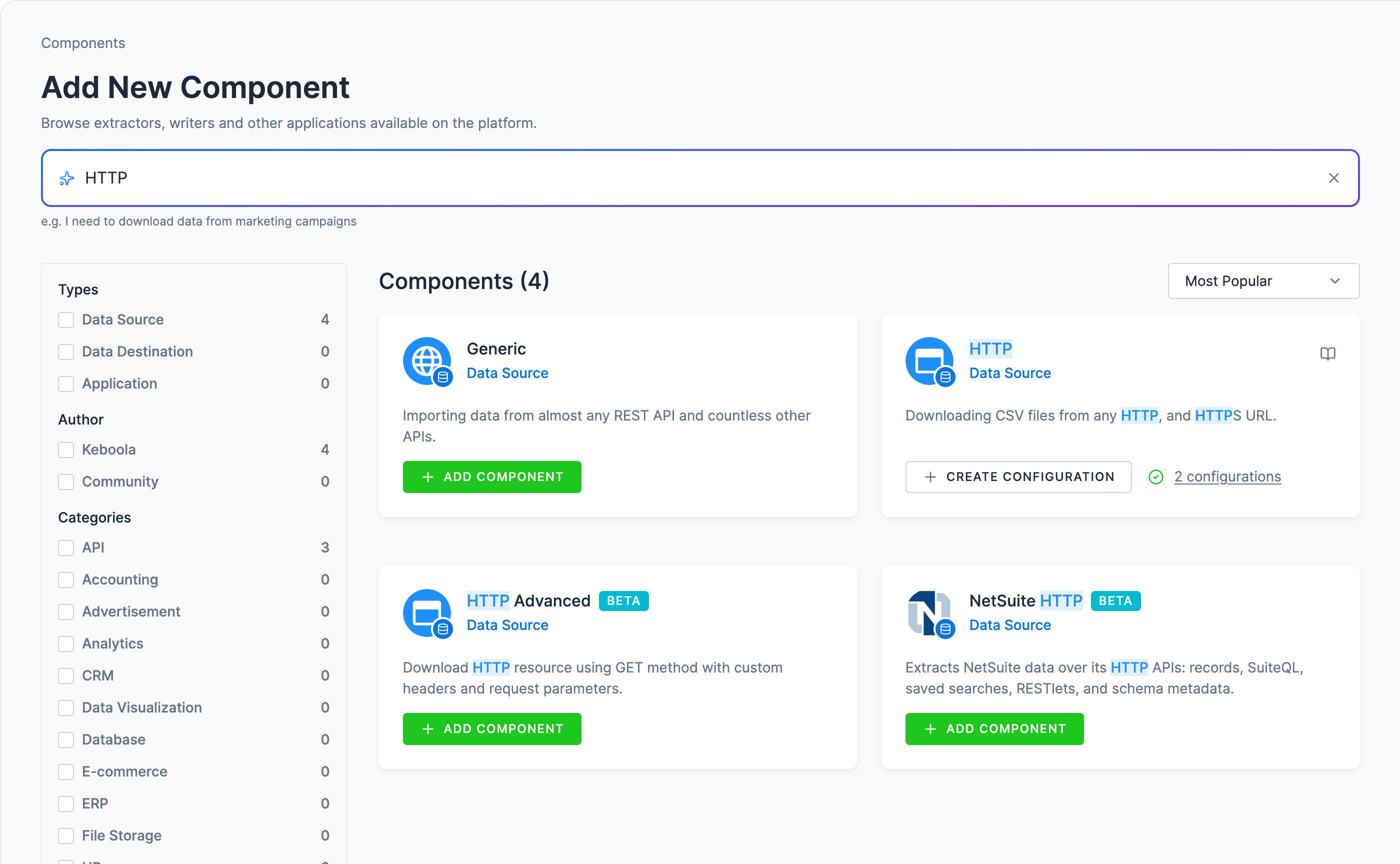
-
Choose Connect To My Data. (Use With Demo Data sets the connector up against a dataset Keboola prepared, handy for a look around, but here you want your own URL.)
-
Replace the suggested name with
Boolabean sales, add a description, and click Create Configuration. Descriptions are what keep a project readable six months later; see the best practices cheat sheet.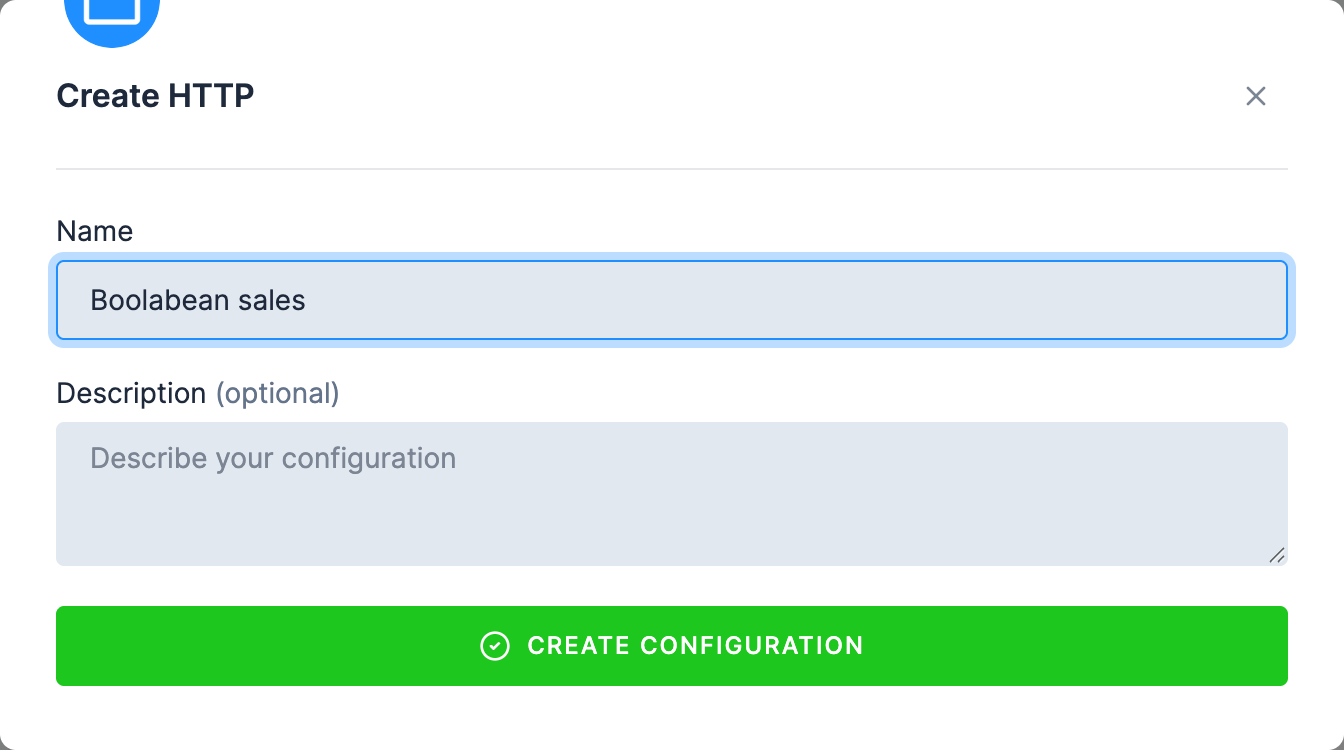
-
If the configuration opens with a single File URL field, switch to Advanced Mode. A new configuration may start in a simplified mode that takes one URL and nothing else: no base URL, no rows. Its own hint says as much: switch modes if you “want to load more files at once”. Use Advanced Mode, top right, and confirm. This is one-way: the button disappears afterwards, and the change is recorded on the configuration as Disable simplified mode. If you already see Base URL and Connection Options and a Rows section, you are in the right mode and there is nothing to switch.
-
Open Base URL and Connection Options and set Base URL to the folder shared by every file this configuration downloads, with its trailing slash, then click Save:
https://help.keboola.com/getting-started/boolabean/
Add the five tables
Each file is a configuration row with its own path and settings, sharing the configuration’s base URL.
-
In the Rows section, click Add Row, name it
stores, and click Create. The row name becomes the Storage table name, so use exactly this spelling. -
Under Download Settings, set Path to the file name, relative to the base URL:
stores.csv -
Check the rest of the row and click Save:
- Save Settings → Table name is already
stores, taken from the row name. - Delimiter
,and Enclosure"are already right for these files. - Leave Incremental load off: each run should replace the table, not append to it.
- Header & Primary Key → Read Header already says Read the header from the file(s) header, which is what you want; the sample files carry column names on the first line. Leave it alone. (The alternative, Set Header, is typing the columns yourself; the forecast below is where that becomes necessary.)
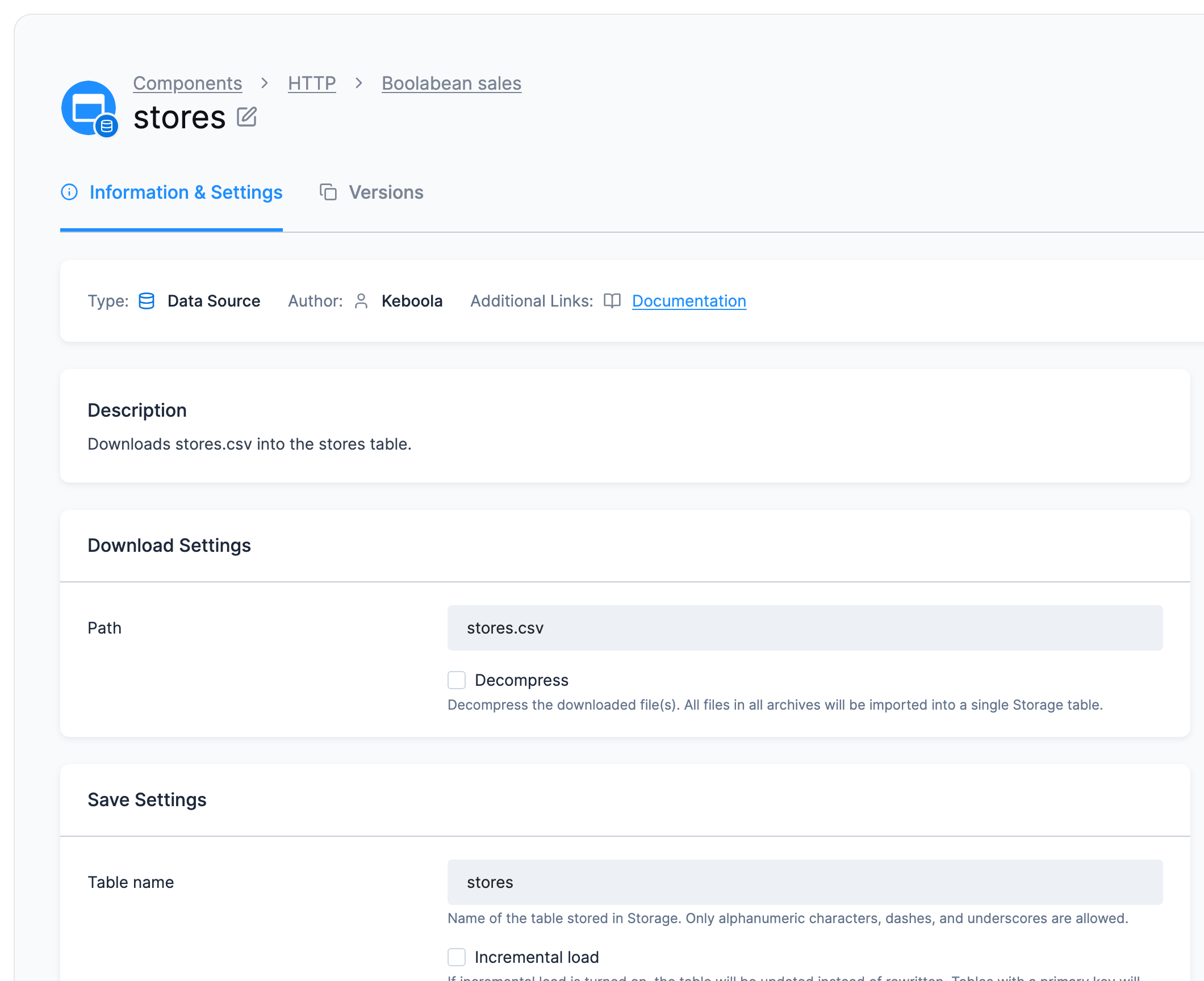
- Save Settings → Table name is already
-
Repeat steps 6 to 8 for the other four files:
Row name Path productsproducts.csvsalessales.csvstaffingstaffing.csvweather_dailyweather_daily.csv -
Back on the configuration, click Run Component and confirm with Run. One run fetches all five rows; in Jobs it may fan out into a job per row under the one you started.
Add the forecast
-
Create a second configuration the same way (steps 1 to 5), named
Boolabean forecast, with the base URLhttps://api.open-meteo.com/v1/. Add one row namedforecast, set its Path to the rest of the forecast URL, and save:forecast?latitude=50.0755,49.1928,49.8352,49.7475,49.5938,50.7663&longitude=14.4426,16.6083,18.2833,13.3776,17.2509,15.0562&daily=temperature_2m_max,precipitation_sum&timezone=Europe%2FPrague&format=csv -
The visual form cannot skip the seven metadata lines and the blank line before the header, so this row is finished in JSON. Click Code Editor at the top of the row, replace the
processorsblock with the one below, and save:"processors": {"after": [{ "definition": { "component": "keboola.processor-move-files" },"parameters": { "direction": "tables", "folder": "forecast" } },{ "definition": { "component": "keboola.processor-skip-lines" },"parameters": { "lines": 9 } },{ "definition": { "component": "keboola.processor-create-manifest" },"parameters": { "delimiter": ",", "enclosure": "\"", "incremental": false,"primary_key": [],"columns": ["location_id", "time", "temperature_2m_max", "precipitation_sum"] } }]}Nine lines skipped, not eight: the header row goes too, and the
columnslist names the columns in its place, without the header’s unit suffixes. From now on this row opens in the code editor, and the Visual Editor button stays disabled with the note Can’t close the code editor, the configuration is not compatible. That is expected.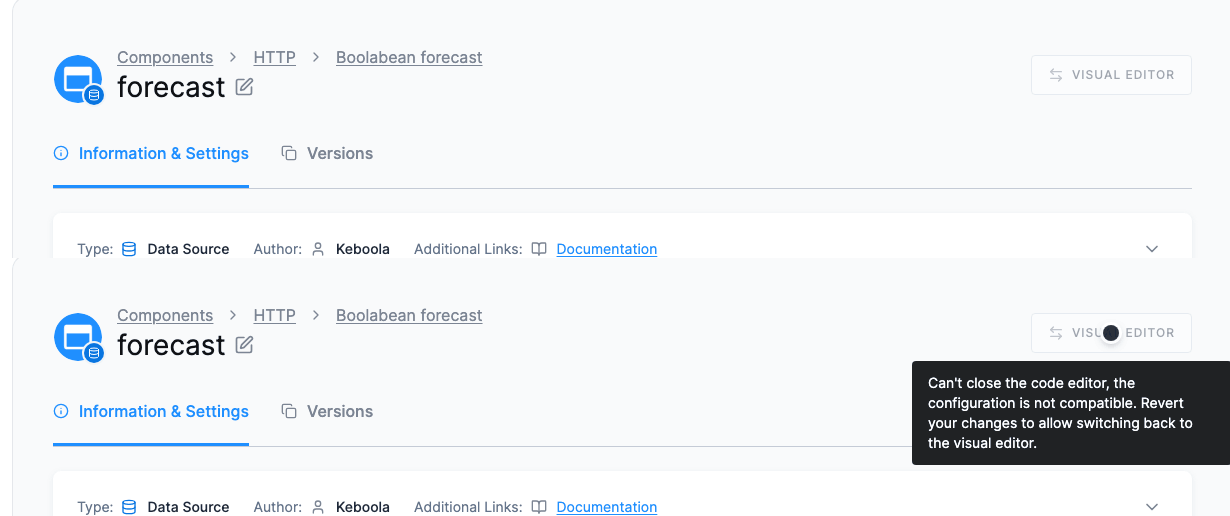
-
Run Component on this configuration as well.
Every click above is an API call underneath, and kbagent is the same calls from a terminal.
This tab needs two things the other two do not. kbagent
installed and pointed at your project once with kbagent project add,
which stores the connection under an alias. The examples use docs-demo, substitute yours. And
for the raw-request examples, two values you read off your own project: <your-stack> is the host
you sign in at, the part after https:// in the browser’s address bar (for example
connection.europe-west3.gcp.keboola.com), and $KBC_TOKEN is a Storage API token from
Users & Settings → API Tokens.
Create the configuration
The configuration itself carries only the base URL. --no-files says “just create it remotely”,
and --dry-run shows the request and validates it against the component’s schema without creating
anything:
kbagent config new --project docs-demo --component-id keboola.ex-http --name "Boolabean sales" --push --no-files --configuration '{"parameters":{"baseUrl":"https://help.keboola.com/getting-started/boolabean/"}}'It prints the new configuration ID; keep it for the next two commands. The same call as a raw request, if you would rather see it:
curl -X POST "https://<your-stack>/v2/storage/components/keboola.ex-http/configs" -H "X-StorageApi-Token: $KBC_TOKEN" -F "name=Boolabean sales" -F 'configuration={"parameters":{"baseUrl":"https://help.keboola.com/getting-started/boolabean/"}}'Add the five tables
Each file is a row on that configuration. The row’s JSON is the path, plus the processors that put the result in a table of the same name and read the column names from the file’s header: the same three settings the UI tab fills in by hand:
kbagent config row-create --project docs-demo --component-id keboola.ex-http --config-id <config-id> --name stores --configuration '{"parameters":{"path":"stores.csv"},"processors":{"after":[{"definition":{"component":"keboola.processor-move-files"},"parameters":{"direction":"tables","folder":"stores"}},{"definition":{"component":"keboola.processor-create-manifest"},"parameters":{"delimiter":",","enclosure":"\"","incremental":false,"primary_key":[],"columns_from":"header"}},{"definition":{"component":"keboola.processor-skip-lines"},"parameters":{"lines":1}}]}}'Repeat for products, sales, staffing and weather_daily, changing the name, the path and
the folder together. Then run the configuration and wait for the job:
kbagent job run --project docs-demo --component-id keboola.ex-http --config-id <config-id> --waitAdd the forecast
The same two commands. The difference is the row’s processors: nine lines skipped instead of one, and the four column names given explicitly instead of read from a header.
kbagent config new --project docs-demo --component-id keboola.ex-http --name "Boolabean forecast" --push --no-files --configuration '{"parameters":{"baseUrl":"https://api.open-meteo.com/v1/"}}'The row’s JSON is long, and --configuration takes @file, so put it in one:
{ "parameters": { "path": "forecast?latitude=50.0755,49.1928,49.8352,49.7475,49.5938,50.7663&longitude=14.4426,16.6083,18.2833,13.3776,17.2509,15.0562&daily=temperature_2m_max,precipitation_sum&timezone=Europe%2FPrague&format=csv" }, "processors": { "after": [ { "definition": { "component": "keboola.processor-move-files" }, "parameters": { "direction": "tables", "folder": "forecast" } }, { "definition": { "component": "keboola.processor-skip-lines" }, "parameters": { "lines": 9 } }, { "definition": { "component": "keboola.processor-create-manifest" }, "parameters": { "delimiter": ",", "enclosure": "\"", "incremental": false, "primary_key": [], "columns": ["location_id", "time", "temperature_2m_max", "precipitation_sum"] } } ] }}Nine lines skipped, not eight: the header goes too, and columns names the four columns in its
place, without the header’s unit suffixes.
kbagent config row-create --project docs-demo --component-id keboola.ex-http --config-id <forecast-config-id> --name forecast --configuration @forecast-row.jsonkbagent job run --project docs-demo --component-id keboola.ex-http --config-id <forecast-config-id> --waitCheck: the tables and their row counts, without leaving the terminal. Without --bucket-id
it lists every table in the project, which is how you find the bucket the connector created:
kbagent storage tables --project docs-demo --bucket-id in.c-keboola-ex-http-<config-id>kbagent storage table-detail --project docs-demo --table-id in.c-keboola-ex-http-<config-id>.salesCheck it worked
Section titled “Check it worked”Open Storage. Each configuration made a bucket of its own, with an IN badge: one holds the
five sample tables, the other forecast. The first bucket’s page lists the five with their row
counts:
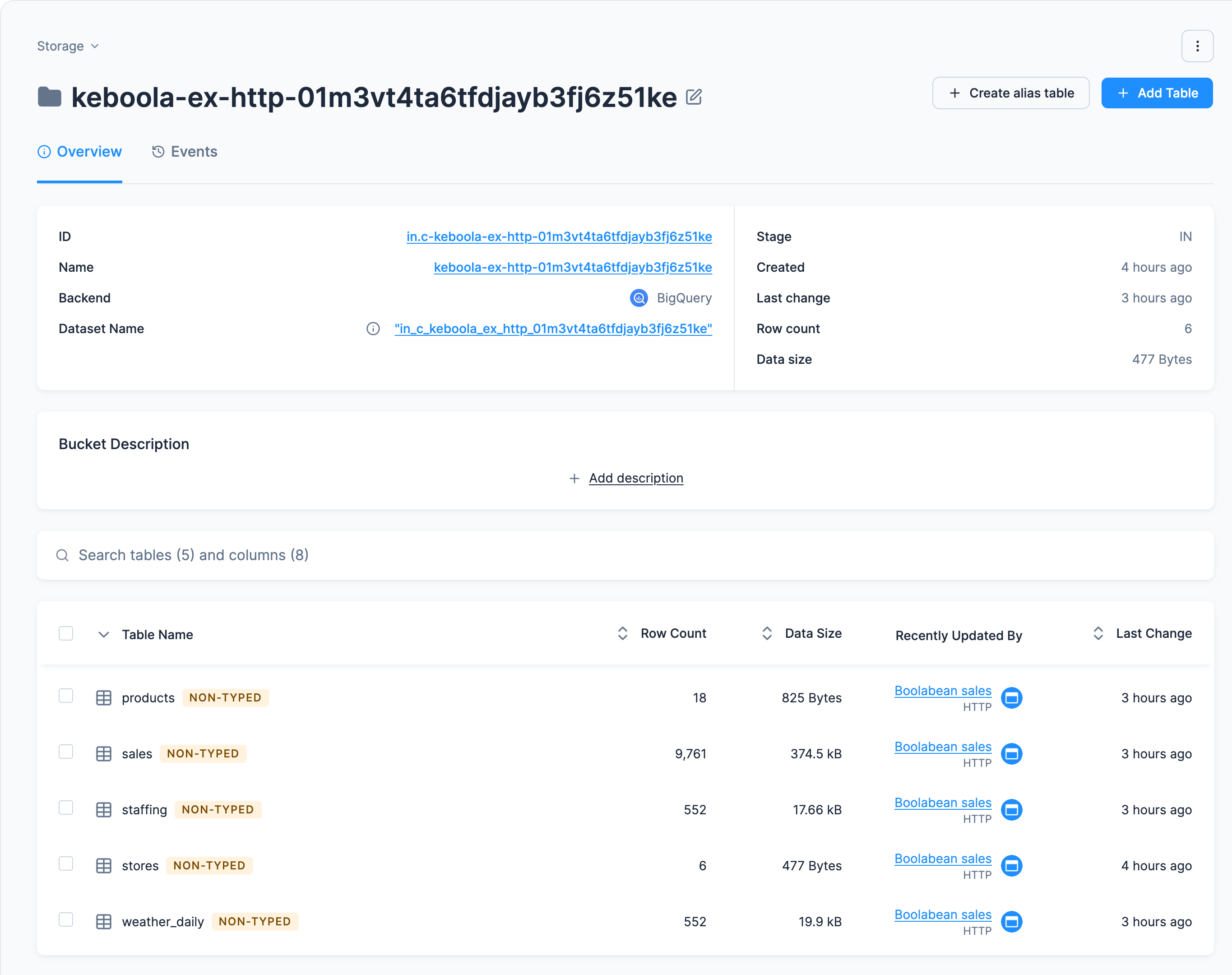
saleshas 9,761 rows;stores6,products18,staffingandweather_daily552 each.forecasthas 42 rows: seven dates,location_id0 to 5.- Every column arrived as text. The connector does not guess types, so the next page casts them.
Your bucket names will differ, and what else to look at
A bucket is named after the component plus the configuration’s ID, like
keboola-ex-http-01m3vt4ta6tfdjayb3fj6z51ke, so yours will not match the screenshots, and that is
fine. The next step refers to the tables by their names inside the transformation; it is those
names the SQL depends on.
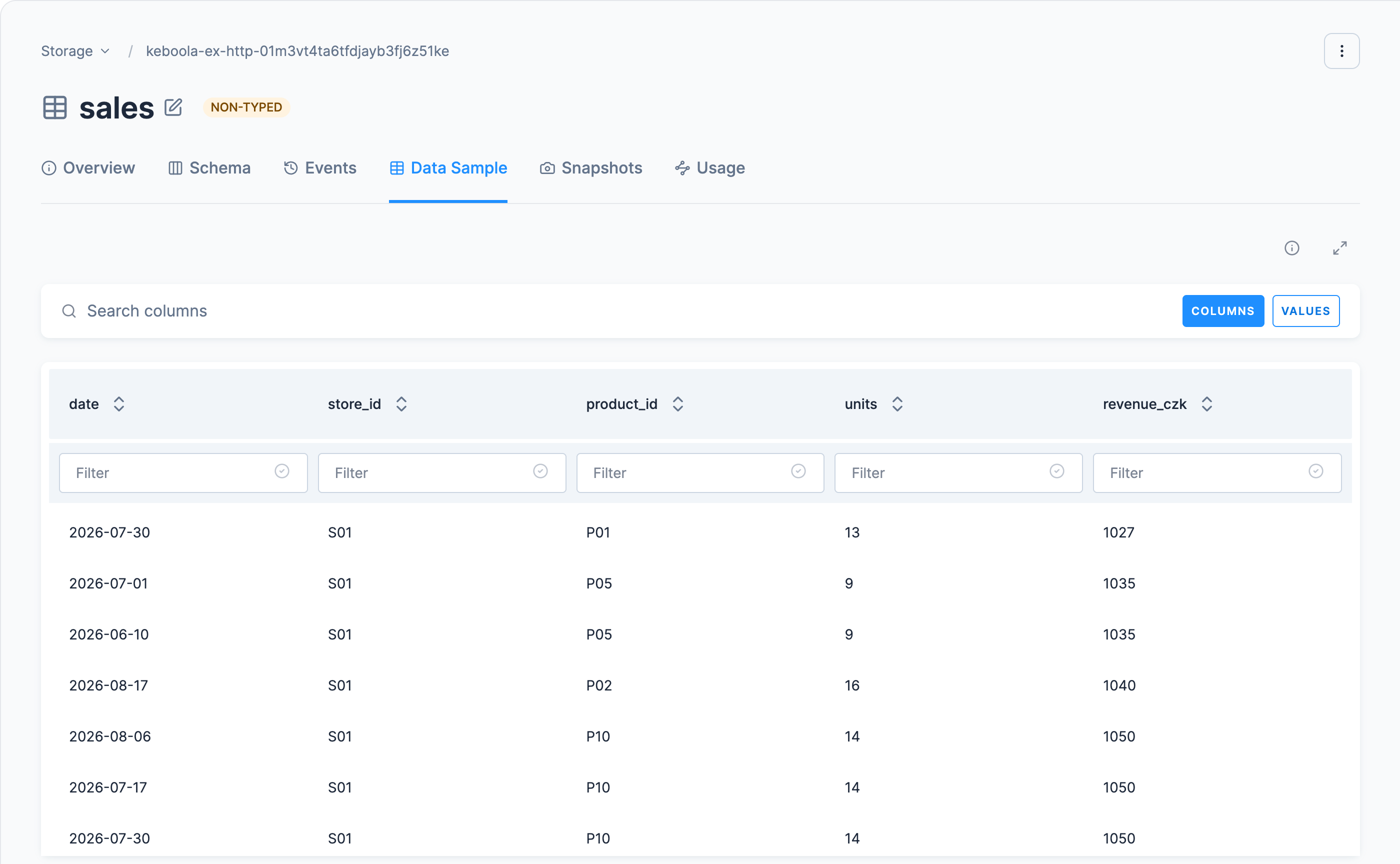
Click a table and open its Data Sample tab to see the real contents: sales has the columns
date, store_id, product_id, units and revenue_czk. In Jobs, the five rows of the first
configuration are fetched in turn, so expect about six minutes for all five; the forecast takes
seconds.
If it goes wrong
Section titled “If it goes wrong”The job fails with a 404
Base URL and path are concatenated. With the base URL ending in a slash and the path a bare
file name, https://help.keboola.com/getting-started/boolabean/ + stores.csv is right; a slash on
both sides gives a double slash, and a slash on neither runs the folder into the file name. Open the
full URL in a browser to see whether the file is really there.
Every row arrives as one column
The Delimiter setting does not match the file. These files are comma-separated.
The first data row is missing, or the columns are called col_1
Wrong header option: set Read Header back to Read the header from the file(s) header.
The table is empty, but the job succeeded
The URL returned an HTML error page instead of a CSV. Open it in a browser to see what actually comes back.
The forecast has 43 rows, and one of them says time in the time column
The skip count is one short and the header was loaded as data. It should be 9 with named columns, or 8 with Read the header and the header’s own names, unit suffixes included.
You want the five files fetched at the same time
Raise Parallel jobs on the configuration; the connector then processes its rows concurrently.
Going further
Section titled “Going further”A public URL is the quickest way to real data in a new project. Production data sits behind credentials and keeps changing; both side trips are this step against a source you authorize first.
- Load from Google Sheets: a small reference table from a spreadsheet you own.
- Load from a database: the pattern every database connector follows.
Was this page helpful?
Thank you for helping improve Keboola's documentation!