# Publish Component
As described in the [architecture overview](https://help.keboola.com/overview/), Keboola consists of many different components.
Only those components that are published in our **Component List** are generally available in Keboola.
The list can be found in our [Storage Component API](https://api.keboola.com/?service=storage#get-/v2/storage) in the dedicated [Components section](https://api.keboola.com/?service=storage#get-/v2/storage).
The list of components is managed using the Keboola [Developer Portal](https://components.keboola.com/).
That being said, any Keboola user can use any component, unless
- the Keboola user (or their token) has a [limited access to the component](https://help.keboola.com/storage/tokens/).
- the component itself limits where it can run (in what projects and for which users).
If you have not yet created your component, please go through the [tutorial](https://help.keboola.com/extend/component/tutorial/), which will
navigate you through creating an account in the [Developer Portal](https://components.keboola.com/) and
[initializing the component](https://help.keboola.com/extend/component/tutorial/).
## Publishing Component
A non-published component can be used without limitations, but it is not offered in the Keboola UI. It can only be used via
the [API](https://api.keboola.com/?service=storage#tag--Component-Configurations) or by directly visiting a link with the
specific component ID:
https://connection.keboola.com/admin/projects/{PROJECT_ID}/extractors/{COMPONENT_ID}
This way you can fully test your component before requesting its publication. Also, unpublished
components are not part of our [list of public components](https://components.keboola.com/components).
An existing configuration of a non-public component is accessible the same way as a configuration of any other component.
**Important:** Changes made in the Developer Portal take up to 5 minutes to propagate to all Keboola instances in all regions.
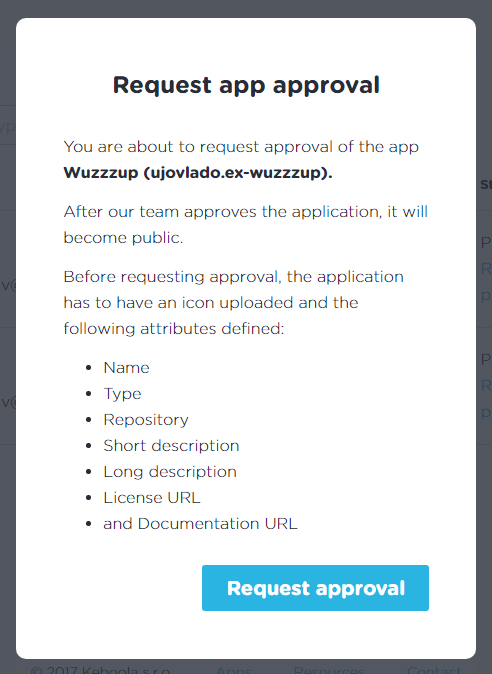
Before your component can be published, it must be approved by Keboola. Request the approval from the component list in
the [Developer Portal](https://components.keboola.com/). We will review your component and either publish it or contact you
with required changes.
## Component Review
The goal of the component review is to maintain reasonable end-user experience and component reliability. Before
applying for component registration, make sure the same component does not already exist. If there is a similar one
(e.g., an extractor for the same service), clearly state the differences in the new component's description. During our
component review, the best practices in the next sections are followed.
### Component Name and Description
Before you name and describe your component, check out our YouTube, Facebook Pages, Dark Sky, and ECB Currency Rates
components for inspiration.
- Names should not contain words like `extractor`, `application`, and `writer`.
OK: *Cloudera Impala*
WRONG: *Cloudera Extractor*
- The short description describes the **service** (helping the user find it) rather than the component.
Obviously for large services like Facebook or Gmail, describe the part of the service relevant to the component.
OK: *Native analytic database for Apache Hadoop*
WRONG: *This extractor extracts data from Cloudera Impala*
OK: *Facebook Pages connect your business with people. Facebook Insights help you get good at it.*
WRONG: *Facebook connects you with friends, family and other people you know, allows you to share photos and videos, send messages and get updates.*
- The long description provides **additional information about the extracted/written data**:
What will the end user get? What must the end user provide? Is the data going to be imported incrementally? Are there links to
available resources?
Configuration instructions should not be included in the long description, because the long description
is displayed before the end user starts configuring the component. However, if there are any special requirements (external approval,
specific account setting), they should be stated.
OK: *This component allows you to extract currency exchange rates as published by the European Central Bank (ECB). The
exchange rates are available from a base currency (USD, EUR) to 30 destination currencies (AUD, BGN, BRL, CAD, CNY,
CZK, EUR, GBP, HKD, HRK, HUF, CHF, IDR, ILS, INR, JPY, KRW, MXN, MYR, NOK, NZD, PHP, PLN, RON, RUB, SEK, SGD, THB, TRY,
ZAR). The rates are available for all working days from 4 January 1999 up to present.*
- Component icons must be of representative and reasonable quality. Make sure the icon license allows you to use it.
- Components must correctly state the data flow — [UI options](https://help.keboola.com/extend/component/ui-options/). Use
`appInfo.dataOut` and `appInfo.dataIn` for this purpose:
- Use `appInfo.dataIn` for extractors, which bring data into a Keboola project (omit `appInfo.dataOut` for extractors).
- Use `appInfo.dataOut` for writers, which send data outside (omit `appInfo.dataIn` for writers).
- Use `appInfo.dataIn` and/or `appInfo.dataOut` for applications.
- Use `appInfo.beta` in [UI options](https://help.keboola.com/extend/component/ui-options/) if you suspect changes to the component behavior.
- Licensing information must be valid, and the vendor description must be current.
### Component Icon
- Use a PNG image that is at least 256x256px large and has transparent background.
### Component Configuration
- Use only the necessary [UI options](https://help.keboola.com/extend/component/ui-options/) (i.e., if there are no output files, do not use `genericDockerUI-fileOutput`).
- For extractors, always use the [default bucket](https://help.keboola.com/extend/common-interface/folders/#default-bucket) — do not use the `genericDockerUI-tableOutput` flag.
- Use [encryption](https://help.keboola.com/extend/encryption/) to store sensitive values. No plain-text passwords!
- Use a [configuration schema](https://help.keboola.com/extend/component/ui-options/configuration-schema/).
- List all properties in the `required` field.
- Always use `propertyOrder` to explicitly define the order of the fields in the form.
- Use your short `title` without a colon, period, etc.
- Use `description` to provide an explanatory sentence if needed.
OK: 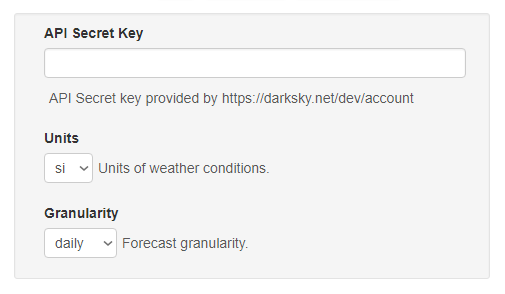
WRONG: 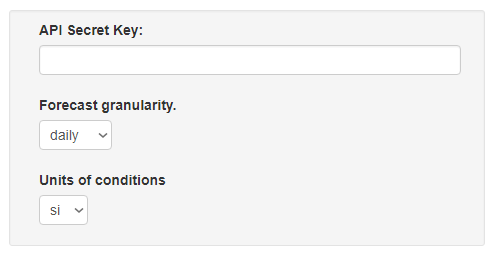
- Use a configuration description only if the configuration is not trivial/self-explanatory. Provide **links to resources**
(for instance, when creating an Elastic extractor, not everyone is familiar with the ElasticSearch query syntax). The
configuration description supports markdown. Your markdown should not start with a header and should use only level 3 and
level 4 headers (level 2 header is prepended before the configuration description).
OK:
some introduction text

### Input
Description

description of input tables


#### First Table

some other text
WRONG:
## Configuration Description

some introduction text


#### Input Description

description of input tables
### Component Internals
- Make sure that the amount of consumed **memory does not depend** on the amount of processed data. Use streaming or
processing in chunks to maintain a limited amount of consumed memory. If not possible, state the expected usage in
the **Component Limits**.
- The component must distinguish between [user and application errors](https://help.keboola.com/extend/common-interface/environment/#return-values).
- The component must [validate](https://help.keboola.com/extend/common-interface/config-file/#validation) its parameters; an invalid configuration must result in a user error. User error messages must clearly state what's wrong and what the user should do to fix the issue. E.g., `Invalid configuration.` is wrong, `Login failed, check your credentials.` is better.
- The events produced must be reasonable. Provide status messages if possible and with a reasonable frequency. Avoid internal messages with no meaning to the end user. Also avoid flooding the event log or sending data files in the event log.
- Set up [continuous deployment](https://help.keboola.com/extend/component/deployment/) so that you can keep the component up to date.
- Use [semantic versioning](http://semver.org/) to mark and deploy versions of your component. Using other tags (e.g.,
`latest`, `master`) in production is not allowed.
### Checklist
Before requesting to publish a component, please check all rules using [this checklist](https://help.keboola.com/extend/publish/checklist).
---
**Next:** [Checklist →](https://help.keboola.com/extend/publish/checklist/)