# Mapping
*If you are new to Generic Extractor, learn about [mapping in our tutorial](https://help.keboola.com/components/extractors/generic-extractor/tutorial/mapping/) first.*
*Use the [Parameter Map](https://help.keboola.com/components/extractors/generic-extractor/map/) to help you navigate among various configuration options.*
Mapping allows you to **modify a response conversion process** in which Generic Extractor receives JSON responses,
[merges them](https://help.keboola.com/components/extractors/generic-extractor/configuration/config/jobs/#merging-responses), and
converts them to CSV files, which are then imported to Keboola.
Manually define mapping if you wish to do the following:
- Set up a primary key to simplify relations between result tables and speed up the extraction,
- Avoid extraction of unnecessary properties which make result tables cluttered,
- Split a single response into multiple result tables,
- Override the automatic conversion for any other reason.
The automatic conversion between JSON and CSV (Storage Tables) is defined by the following rules (see an
[example](https://help.keboola.com/components/extractors/generic-extractor/configuration/config/mappings/#automatic-mapping)):
- If the value of a JSON field is a [scalar](https://help.keboola.com/components/extractors/generic-extractor/tutorial/json/#data-values), it is saved as \
the value of the column with the name of the field.
- If the value of a JSON field is an [object](https://help.keboola.com/components/extractors/generic-extractor/tutorial/json/#data-values), each of the
object property values will be added as a value of a column with an auto-generated name.
- If the value of a JSON field is an [array](https://help.keboola.com/components/extractors/generic-extractor/tutorial/json/#data-values), a new table
will be created and linked by the `JSON_parentId` column.
Mapping configuration allows you to manually modify or override this behavior for a
[`dataType`](https://help.keboola.com/components/extractors/generic-extractor/configuration/config/jobs/#data-type)
defined in a job. The following is a mapping configuration example:
```json
"mappings": {
"users": {
"address.country": {
"type": "column",
"mapping": {
"destination": "country"
}
}
}
}
```
## Configuration
The `mappings` configuration is a deeply nested object. The first level of keys are `dataType`
values used in the [job configurations](https://help.keboola.com/components/extractors/generic-extractor/configuration/config/jobs/#data-type). The
second level of keys are the names of the properties found (or expected) in the response.
Then, the value is an object with the following properties:
- `type` (optional, string) — Mapping type, either `column`, `table` or `user`. The default value is `column`.
- `mapping` (required, object) — Mapping configuration; depends on the mapping type.
The following configuration shows a sample mapping configuration for dataType `users` and column `id`:
```json
"mappings": {
"users": {
"id": {
"type": "column",
"mapping": {
"destination": "user_id"
}
}
}
}
```
### User interface
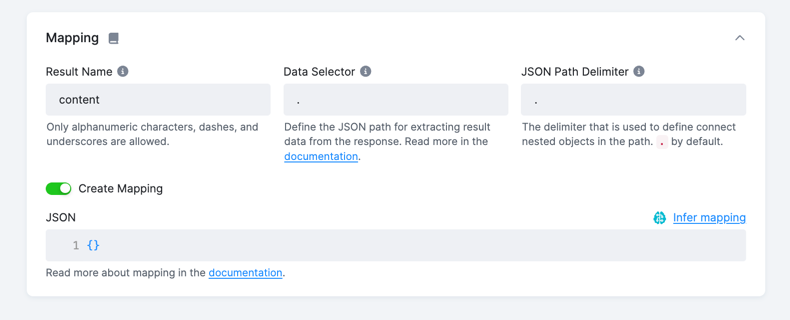
In the UI, the mapping can be created for each endpoint in the `Endpoints`.`Mapping section` by clicking `Create Mapping` toggle.
#### Mapping detection
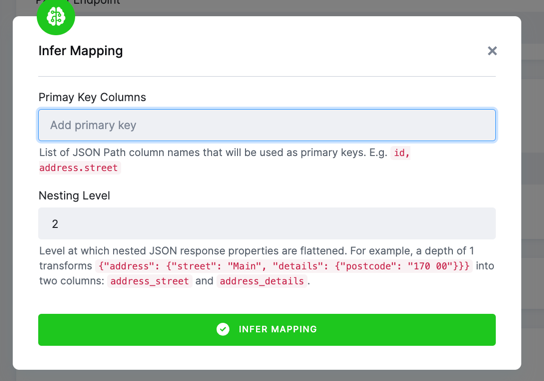
You may opt to generate the mapping automatically by clicking the `Infer Mapping` button in the top right corner.
This operation will generate a mapping based on the enpoint's sample response, which may help as a starting point for further manual adjustments.
In most cases, this method is sufficient and doesn't require any additional edits.
##### Primary key
You can specify a `.` separated path of the elements in the response to create a primary key. **NOTE** that if you are mapping child jobs,
the parent keys will automatically be included.
##### Nesting level
Currently, the automatic detection outputs only single table mapping. You can control the nesting level by specifying
the `Nesting Level` property. For example, a depth of 1 transforms `{"address": {"street": "Main", "details": {"postcode": "170 00"}}}` into two columns: `address_street` and `address_details`.
All elements that have ambiguous types or are beyond the specified depth are stored in a single column as JSON, e.g., with the [`force_type`](https://help.keboola.com/components/extractors/generic-extractor/configuration/config/mappings/#mapping-without-processing) option.
### Column mapping
Column mapping represents a basic mapping type that allows you to select extracted
columns, rename them, and optionally set a primary key on them. The mapping
configuration requires:
- `type` (optional, string) — Can be omitted or must be `column`.
- `mapping` (required, object) — Object with two properties:
- `destination` (required, string) — Name of the column in the output table
- `primaryKey` (optional, boolean) — If `true`, then a primary key will be set on the column. The default value is `false`.
- `forceType` (optional, boolean) — If set to `true`, the property will not be processed and will be stored as an encoded
JSON (see an [example](https://help.keboola.com/components/extractors/generic-extractor/configuration/config/mappings/#mapping-without-processing)).
### User mapping
User mapping has the same configuration as the [column mapping](https://help.keboola.com/components/extractors/generic-extractor/configuration/config/mappings/#column-mapping). The only difference is
that it applies to *virtual properties*. This is useful mainly for working with auto-generated properties/columns
in child jobs (see an [example](https://help.keboola.com/components/extractors/generic-extractor/configuration/config/mappings/#mapping-child-jobs)).
### Table mapping
Table mapping allows you to create a new table from a particular property of the response object. Table
mapping is, by default, used for arrays. The mapping configuration requires:
- `type` (required, string) — Must be set to `table`.
- `destination` (required, string) — Name of the output table.
- `tableMapping` (required, object) — Object with another mapping configuration (required unless `parentKey.disable` is
set to `true` — see below).
- `parentKey` (optional, object) — Configuration of the parent-child relationship between tables:
- `destination` (optional, string) — Name of the column which links to the parent table. The default value is the name
of the parent table with the suffix `_pkey`. See an [example](https://help.keboola.com/components/extractors/generic-extractor/configuration/config/mappings/#using-primary-keys).
- `primaryKey` (optional, boolean) — Set to `true` to mark the link column as a primary key for the child table too.
The default value is `false`. See an [example](https://help.keboola.com/components/extractors/generic-extractor/configuration/config/mappings/#using-primary-keys).
- `disable` (optional, boolean) — Completely disables the parent-child relationship, disables configured
`tableMapping`. See an [example](https://help.keboola.com/components/extractors/generic-extractor/configuration/config/mappings/#disabled-parent-key).
The following configuration takes the `contacts` property from the response and makes a new table
(`user-contact`) from it; the `contacts.email` is mapped to the `email` column and the property
`contacts.phone` is mapped to the column `tel`. See more in the [examples](https://help.keboola.com/components/extractors/generic-extractor/configuration/config/mappings/#table-mapping-examples).
```json
"contacts": {
"type": "table",
"destination": "user-contact",
"tableMapping": {
"email": {
"type": "column",
"mapping": {
"destination": "email"
}
},
"phone": {
"type": "column",
"mapping": {
"destination": "tel"
}
}
}
}
```
## Examples
The following examples demonstrate how to map JSON responses to CSV files.
### Automatic mapping
Without any configuration, the following JSON response:
```json
[
{
"id": 123,
"name": "John Doe",
"address": {
"street": "Blossom Avenue",
"country": "United Kingdom"
},
"interests": [
"girls", "cars", "flowers"
]
},
{
"id": 234,
"name": "Jane Doe",
"address": {
"street": "Whiteheaven Mansions",
"city": "London",
"country": "United Kingdom"
},
"interests": [
"boys", "cars", "flowers"
]
}
]
```
is converted to the following CSV files (and subsequently Storage tables):
users:
|id|name|address\_street|address\_country|address\_city|interests|
|---|---|---|---|---|---|
|123|John Doe|Blossom Avenue|United Kingdom||users_dab021748b7f93c10476ebe151de4459|
|234|Jane Doe|Whiteheaven Mansions|United Kingdom|London|users_aeb1d126471eef24c0769437f4e7adaa|
users_interests:
|data|JSON_parentId|
|---|---|
|girls|users_dab021748b7f93c10476ebe151de4459|
|cars|users_dab021748b7f93c10476ebe151de4459|
|flowers|users_dab021748b7f93c10476ebe151de4459|
|boys|users_aeb1d126471eef24c0769437f4e7adaa|
|cars|users_aeb1d126471eef24c0769437f4e7adaa|
|flowers|users_aeb1d126471eef24c0769437f4e7adaa|
The nested properties `address.street`, `address.county` and `address_city` were automatically
flattened into columns named as a concatenation of the parent and child property names. The
array property `interests` was turned into a separate table and linked using
`JSON_parentId` column and auto-generated keys.
See [example [EX063]](https://github.com/keboola/generic-extractor/tree/master/doc/examples/063-mapping-automatic).
**Note:** When using automatic mapping, you may get result tables with **changing structure**. A typical example is
when the API returns a completely empty response in which case no tables are created for the job.
When Manual mapping is used, the generated table structure always honors the mapping setting.
See [example [EX137]](https://github.com/keboola/generic-extractor/tree/master/doc/examples/137-mapping-tables-nested-empty).
### Basic manual mapping
Maybe you are not interested in the user `interests` and want to simplify the user table
to three columns: `country`, `name` and `id`. The following mapping configuration does the trick:
```json
{
"parameters": {
"api": {
"baseUrl": "http://example.com/"
},
"config": {
"debug": true,
"outputBucket": "mock-server",
"jobs": [
{
"endpoint": "users",
"dataType": "users"
}
],
"mappings": {
"users": {
"address.country": {
"type": "column",
"mapping": {
"destination": "country"
}
},
"name": {
"type": "column",
"mapping": {
"destination": "name"
}
},
"id": {
"mapping": {
"destination": "id",
"primaryKey": true
}
}
}
}
}
}
}
```
The `mappings` settings has the key `users` which is the value of the `job.dataType` property. The keys in
the `users` objects are the names of the properties in the JSON response. The values are the mapping configurations for
each property. The mapping is always exhaustive; only the mentioned properties get processed, while the others are
completely ignored. The above configuration also sets the primary key on the `id` column.
All three mapped properties are mapped to columns (the `id` property relies on the default value for `type`).
Notice that in the nested properties, you need to enter the name/path in the JSON response (`address.country`).
You cannot use the auto-generated name produced without any mapping (`address_country`), because the automatic
processing is turned off by the mapping.
Take great care to **use the correct keys** in the mapping! If you misspell the first-level key, the entire configuration
will be ignored (it will refer to a non-existent data type). If you misspell the second-level key, you will get
an empty column in the result (referring to a non-existent property of the response). With the
correct settings, the following table will be produced:
|country|name|id|
|---|---|---|
|United Kingdom|John Doe|123|
|United Kingdom|Jane Doe|234|
See [example [EX064]](https://github.com/keboola/generic-extractor/tree/master/doc/examples/064-mapping-basic).
### Mapping child jobs
Let's say that you have an API endpoint `/users` which returns a response similar to:
```json
[
{
"id": 123,
"name": "John Doe"
},
{
"id": 234,
"name": "Jane Doe"
}
]
```
More details about the user can be retrieved through another endpoint — `/user/{id}`, where `{id}` is
the user ID:
```json
{
"id": 123,
"name": "John Doe",
"address": {
"city": "London",
"country": "UK",
"street": "Whitehaven Mansions"
},
"interests": [
"girls", "cars", "flowers"
]
}
```
To handle this situation in Generic Extractor, use a [child job](https://help.keboola.com/components/extractors/generic-extractor/configuration/config/jobs/#children):
```json
"jobs": [
{
"endpoint": "users",
"dataType": "users",
"children": [
{
"endpoint": "user/{user-id}",
"dataType": "user-detail",
"dataField": ".",
"placeholders": {
"user-id": "id"
}
}
]
}
]
```
The produced user-detail table will look like this:
|id|name|address\_city|address\_country|address\_street|interests|parent_id|
|---|---|---|---|---|---|---|
|123|John Doe|London|UK|Whitehaven Mansions|user-detail_3484bd6e10690a3a2e77079f69ceaa42|123|
|234|Jane Doe|St Mary Mead|UK|High Street|user-detail_a7655e39a0399dc842b44365778cd295|234|
Note that the name of the column `parent_id` depends on the [placeholder configuration](https://help.keboola.com/components/extractors/generic-extractor/configuration/config/jobs/children/#basic-example)
and is not always `parent_id` (see [example](https://help.keboola.com/components/extractors/generic-extractor/configuration/config/jobs/children/#basic-job-with-array-values)).
Now you can use the following mapping to shape the table:
```json
"mapping": {
"user-detail": {
"address.country": {
"type": "column",
"mapping": {
"destination": "country"
}
},
"parent_id": {
"type": "user",
"mapping": {
"destination": "user_id"
}
}
}
}
```
and get the following user-detail table:
|country|user_id|
|---|---|
|UK|123|
|UK|234|
The important part of the mapping configuration is that you **must** use `"type": "user"`
for the mapping type of the `parent_id` (`user_id`) column. This is because the
column `parent_id` does not really exist in the response as it is generated dynamically for the child job.
See [example [EX065]](https://github.com/keboola/generic-extractor/tree/master/doc/examples/065-mapping-child-jobs).
### Mapping without processing
The `forceType` configuration property allows you to skip a part of the API response from processing.
With the following API response:
```json
[
{
"id": 123,
"name": "John Doe",
"address": {
"street": "Blossom Avenue",
"country": "United Kingdom"
},
"interests": [
"girls", "cars", "flowers"
]
},
{
"id": 234,
"name": "Jane Doe",
"address": {
"street": "Whiteheaven Mansions",
"city": "London",
"country": "United Kingdom"
},
"interests": [
"boys", "cars", "flowers"
]
}
]
```
and the following mapping configuration:
```json
"mappings": {
"users": {
"name": {
"mapping": {
"destination": "name"
}
},
"id": {
"type": "column",
"mapping": {
"destination": "id",
"primaryKey": true
}
},
"interests": {
"type": "column",
"mapping": {
"destination": "interests"
},
"forceType": true
}
}
}
```
the result table `users` contains the `interests` field unprocessed and left as JSON fragments:
|name|id|interests|
|---|---|---|
|John Doe|123|["girls","cars","flowers"]|
|Jane Doe|234|["boys","cars","flowers"]|
The same result can be achieved by using the [`responseFilter` job property](https://help.keboola.com/components/extractors/generic-extractor/configuration/config/jobs/#response-filter):
```json
{
"parameters": {
"api": {
"baseUrl": "http://example.com/"
},
"config": {
"jobs": [
{
"endpoint": "users",
"dataType": "users",
"responseFilter": "interests"
}
]
}
}
}
```
See [example [EX073]](https://github.com/keboola/generic-extractor/tree/master/doc/examples/073-mapping-forceType).
### Table mapping examples
#### Basic table mapping
Because all output columns must be listed in a mapping, using only column mapping settings skips
the `interests` property of the response:
```json
[
{
"id": 123,
"name": "John Doe",
"address": {
"street": "Blossom Avenue",
"country": "United Kingdom"
},
"interests": [
"girls", "cars", "flowers"
]
},
{
"id": 234,
"name": "Jane Doe",
"address": {
"street": "Whiteheaven Mansions",
"city": "London",
"country": "United Kingdom"
},
"interests": [
"boys", "cars", "flowers"
]
}
]
```
The `interests` property cannot be saved as a column therefore, a mapping of the `table` type must be used:
```json
"mappings": {
"users": {
"name": {
"type": "column",
"mapping": {
"destination": "name"
}
},
"id": {
"type": "column",
"mapping": {
"destination": "id"
}
},
"interests": {
"type": "table",
"destination": "user-interests",
"tableMapping": {
".": {
"type": "column",
"mapping": {
"destination": "interest"
}
}
}
}
}
}
```
The table mapping follows the same structure as normal mapping. Each item is another mapping
definition identified by the property name in the JSON file. Because the `interests` property
itself is an array, its value has no name, and therefore, the key is only a dot `"."`. The mapping
value is a standard [column mapping](https://help.keboola.com/components/extractors/generic-extractor/configuration/config/mappings/#column-mapping).
The above configuration produces the same result as automatic column mapping.
See [example [EX066]](https://github.com/keboola/generic-extractor/tree/master/doc/examples/066-mapping-tables-basic).
#### Nested properties
Let's say that you have an API that returns a response like this (it will be used in the following two examples as well):
```json
[
{
"id": 123,
"name": "John Doe",
"contacts": {
"email": "john.doe@example.com",
"phone": "987345765",
"addresses": [
{
"street": "Blossom Avenue",
"country": "United Kingdom"
},
{
"street": "Whiteheaven Mansions",
"city": "London",
"country": "United Kingdom"
}
]
}
},
{
"id": 234,
"name": "Jane Doe",
"contacts": {
"email": "jane.doe@example.com",
"skype": "jane.doe",
"addresses": [
{
"street": "Whiteheaven Mansions",
"city": "London",
"country": "United Kingdom"
}
]
}
}
]
```
With the automatic mapping (without any `mappings` configuration), the following tables will be extracted:
users:
|id|name|contacts\_email|contacts\_phone|contacts\_addresses|contacts\_skype|
|---|---|---|---|---|---|
|123|John Doe|john.doe@example.com|987345765|users.contacts_912c86dec7acdb9d8a17c97eb464aec6||
|234|Jane Doe|jane.doe@example.com||users.contacts_4cf9e859113127acb138872cc630e75f|jane.doe|
users.contacts:
|street|country|city|JSON_parentId|
|---|---|---|---|
|Blossom Avenue|United Kingdom||users.contacts_912c86dec7acdb9d8a17c97eb464aec6|
|Whiteheaven Mansions|United Kingdom|London|users.contacts_912c86dec7acdb9d8a17c97eb464aec6|
|Whiteheaven Mansions|United Kingdom|London|users.contacts_4cf9e859113127acb138872cc630e75f|
This might not be exactly what you want. Perhaps you would like the contacts to be separate from the users and
addresses. This can be done using the following mapping configuration:
```json
"mappings": {
"users": {
"id": {
"type": "column",
"mapping": {
"destination": "id"
}
},
"name": {
"type": "column",
"mapping": {
"destination": "name"
}
},
"contacts": {
"type": "table",
"destination": "user-contact",
"tableMapping": {
"email": {
"type": "column",
"mapping": {
"destination": "email"
}
},
"phone": {
"type": "column",
"mapping": {
"destination": "tel"
}
},
"addresses": {
"type": "table",
"destination": "user-address",
"tableMapping": {
"street": {
"type": "column",
"mapping": {
"destination": "street"
}
},
"country": {
"type": "column",
"mapping": {
"destination": "country"
}
}
}
}
}
}
}
}
```
The above configuration defines that the `contacts` field will be mapped into a separate table
with the columns `email` and `tel` (value of `mapping.destination`). The `address` field will be
mapped into yet another separate table with the columns `street` and `country`.
With the above configuration, the following tables will be created:
users:
|id|name|user-contact|
|---|---|---|
|123|John Doe|b5d72095c441b3a3d6f23ad8142c3f8b|
|234|Jane Doe|5f7f2ab65a680f1a9387a8fafe6b9050|
user-contact:
|email|tel|user-address|users_pk|
|---|---|---|---|
|john.doe@example.com|987345765|1c439a9a39548290f7b7a4513a9224e7|b5d72095c441b3a3d6f23ad8142c3f8b|
|jane.doe@example.com||605e865710f95dba665f6d0e8bc19f1a|5f7f2ab65a680f1a9387a8fafe6b9050|
user-address:
|street|country|user-contact_pk|
|---|---|---|
|Blossom Avenue|United Kingdom|1c439a9a39548290f7b7a4513a9224e7|
|Whiteheaven Mansions|United Kingdom|1c439a9a39548290f7b7a4513a9224e7|
|Whiteheaven Mansions|United Kingdom|605e865710f95dba665f6d0e8bc19f1a|
See [example [EX067]](https://github.com/keboola/generic-extractor/tree/master/doc/examples/067-mapping-tables-nested).
#### Array items
The following examples deal with *arrays of objects*. If you need to deal with *array of scalar* values, see
the [corresponding example](https://help.keboola.com/components/extractors/generic-extractor/configuration/config/mappings/#multiple-primary-key-columns).
Consider the same API response as above:
Click to expand the response.
```json
[
{
"id": 123,
"name": "John Doe",
"contacts": {
"email": "john.doe@example.com",
"phone": "987345765",
"addresses": [
{
"street": "Blossom Avenue",
"country": "United Kingdom"
},
{
"street": "Whiteheaven Mansions",
"city": "London",
"country": "United Kingdom"
}
]
}
},
{
"id": 234,
"name": "Jane Doe",
"contacts": {
"email": "jane.doe@example.com",
"skype": "jane.doe",
"addresses": [
{
"street": "Whiteheaven Mansions",
"city": "London",
"country": "United Kingdom"
}
]
}
}
]
```
Let's say that you know that the `addresses` array contains only two items at most, and therefore,
you want to mark them as the primary and secondary addresses:
```json
"mappings": {
"users": {
"id": {
"type": "column",
"mapping": {
"destination": "id"
}
},
"name": {
"type": "column",
"mapping": {
"destination": "name"
}
},
"contacts": {
"type": "table",
"destination": "user-contact",
"tableMapping": {
"email": {
"type": "column",
"mapping": {
"destination": "email"
}
},
"phone": {
"type": "column",
"mapping": {
"destination": "tel"
}
},
"addresses.0": {
"type": "table",
"destination": "primary-address",
"tableMapping": {
"street": {
"type": "column",
"mapping": {
"destination": "street"
}
},
"country": {
"type": "column",
"mapping": {
"destination": "country"
}
}
}
},
"addresses.1": {
"type": "table",
"destination": "secondary-address",
"tableMapping": {
"street": {
"type": "column",
"mapping": {
"destination": "street"
}
},
"country": {
"type": "column",
"mapping": {
"destination": "country"
}
}
}
}
}
}
}
}
```
The important part of the pretty long configuration is:
```json
"addresses.0": {
"type": "table",
"destination": "primary-address",
"tableMapping": {
"street": {
"type": "column",
"mapping": {
"destination": "street"
}
},
"country": {
"type": "column",
"mapping": {
"destination": "country"
}
}
}
}
```
This picks the first item (remember that array indexes are
[zero-based](https://help.keboola.com/components/extractors/generic-extractor/tutorial/json/#references)) and places it in the
`primary-address` table. Analogously, the `addresses.1` mapping picks the second item from the `addresses`
array and stores it in the `secondary-address` table.
See [example [EX068]](https://github.com/keboola/generic-extractor/tree/master/doc/examples/068-mapping-tables-nested-array).
#### Directly mapping array
The following examples deal with *arrays of objects*; if you need to deal with *array of scalar* values, see
the [corresponding example](https://help.keboola.com/components/extractors/generic-extractor/configuration/config/mappings/#multiple-primary-key-columns).
Consider the same API response as above:
Click to expand the response.
```json
[
{
"id": 123,
"name": "John Doe",
"contacts": {
"email": "john.doe@example.com",
"phone": "987345765",
"addresses": [
{
"street": "Blossom Avenue",
"country": "United Kingdom"
},
{
"street": "Whiteheaven Mansions",
"city": "London",
"country": "United Kingdom"
}
]
}
},
{
"id": 234,
"name": "Jane Doe",
"contacts": {
"email": "jane.doe@example.com",
"skype": "jane.doe",
"addresses": [
{
"street": "Whiteheaven Mansions",
"city": "London",
"country": "United Kingdom"
}
]
}
}
]
```
If you map the table as in the [previous example](https://help.keboola.com/components/extractors/generic-extractor/configuration/config/mappings/#array-items), you will receive a `primary-address` table:
|street|country|user-contact_pk|
|---|---|---|
|Blossom Avenue|United Kingdom|1c439a9a39548290f7b7a4513a9224e7|
|Whiteheaven Mansions|United Kingdom|605e865710f95dba665f6d0e8bc19f1a|
Notice that the records link to the `user-contact` table. This may produce unnecessarily complicated
links between the tables because, from the response, it is obvious that each address is assigned to
a specific user. To avoid this, you can directly map a nested property:
```json
"mappings": {
"users": {
"id": {
"type": "column",
"mapping": {
"destination": "id"
}
},
"name": {
"type": "column",
"mapping": {
"destination": "name"
}
},
"contacts": {
"type": "table",
"destination": "user-contact",
"tableMapping": {
"email": {
"type": "column",
"mapping": {
"destination": "email"
}
},
"phone": {
"type": "column",
"mapping": {
"destination": "tel"
}
}
}
},
"contacts.addresses.0": {
"type": "table",
"destination": "primary-address",
"tableMapping": {
"street": {
"type": "column",
"mapping": {
"destination": "street"
}
},
"country": {
"type": "column",
"mapping": {
"destination": "country"
}
}
}
}
}
}
```
The mapping for the `primary-address` table is now **not nested** inside the mapping for the
`contacts` table. Therefore, it links directly to the `users` table. The content is the same because
the mapping still refers to the same property — the first item of the `addresses` property of `contacts`
(`contacts.addresses.0`). The following table is produced:
|street|country|users_pk|
|---|---|---|
|Blossom Avenue|United Kingdom|b5d72095c441b3a3d6f23ad8142c3f8b|
|Whiteheaven Mansions|United Kingdom|5f7f2ab65a680f1a9387a8fafe6b9050|
The user table now contains an additional column — `primary-address`:
|id|name|user-contact|primary-address|
|---|---|---|---|
|123|John Doe|b5d72095c441b3a3d6f23ad8142c3f8b|b5d72095c441b3a3d6f23ad8142c3f8b|
|234|Jane Doe|5f7f2ab65a680f1a9387a8fafe6b9050|5f7f2ab65a680f1a9387a8fafe6b9050|
See [example [EX069]](https://github.com/keboola/generic-extractor/tree/master/doc/examples/069-mapping-tables-nested-direct).
#### Using primary keys
In the above example, you can see that the `primary-address` table contains
an auto-generated key to link back to users. This is unnecessary because you can safely link to
the user ID. To do this, you only need to specify the primary key for the table:
```json
"mappings": {
"users": {
"id": {
"type": "column",
"mapping": {
"destination": "id",
"primaryKey": true
}
},
"name": {
"type": "column",
"mapping": {
"destination": "name"
}
},
"contacts": {
"type": "table",
"destination": "user-contact",
"parentKey": {
"primaryKey": true,
"destination": "userId"
},
"tableMapping": {
"email": {
"type": "column",
"mapping": {
"destination": "email"
}
},
"phone": {
"type": "column",
"mapping": {
"destination": "phone"
}
}
}
},
"contacts.addresses.0": {
"type": "table",
"destination": "primary-address",
"tableMapping": {
"street": {
"type": "column",
"mapping": {
"destination": "street"
}
},
"country": {
"type": "column",
"mapping": {
"destination": "country"
}
}
}
}
}
}
```
The most important part in the above configuration is the `"primaryKey": true` setting for
the `id` column in the `users` table. Thanks to this, Generic Extractor is able to automatically link
all related records to this ID. In the `user-contact` and `primary-address` tables, the column
`users_pk` will be created, which will contain the user ID. The name is auto-generated as the
name of the parent table with the suffix `_pk`.
To override this auto-generated name, the following configuration is used in the `user-contact`
table, renaming the `users_pk` column to `userId`.
```json
"parentKey": {
"primaryKey": true,
"destination": "userId"
},
```
It also marks the `userId` column in the `user-contact` table as the primary key. The following tables
are produced by the above mapping configuration:
users:
|id|name|
|---|---|
|123|John Doe|
|234|Jane Doe|
user-contact:
|email|phone|userId|
|---|---|---|
|john.doe@example.com|987345765|123|
|jane.doe@example.com||234|
primary-address:
|street|country|users_pk|
|---|---|---|
|Blossom Avenue|United Kingdom|123|
|Whiteheaven Mansions|United Kingdom|234|
See [example [EX070]](https://github.com/keboola/generic-extractor/tree/master/doc/examples/070-mapping-tables-nested-direct-pk).
#### Multiple primary key columns
Generic Extractor allows you to set only a single (primary) key for a table. This means that
if you set `primaryKey` on multiple columns, you will create a compound primary key. Let's say
that you have an API with the following response:
```json
[
{
"firstName": "John",
"lastName": "Doe",
"interests": [
"girls", "cars", "flowers"
]
},
{
"firstName": "John",
"lastName": "Doe",
"interests": [
"boys", "cars", "flowers"
]
}
]
```
Notice that the response does not contain a single unique property (id). You can create the
following configuration:
```json
"mappings": {
"users": {
"firstName": {
"mapping": {
"destination": "first_name",
"primaryKey": true
}
},
"lastName": {
"mapping": {
"destination": "last_name",
"primaryKey": true
}
},
"interests": {
"type": "table",
"destination": "interests",
"tableMapping": {
".": {
"type": "column",
"mapping": {
"destination": "interest"
}
}
}
}
}
}
```
to extract the following tables:
users:
|first\_name|last\_name|
|---|---|
|John|Doe|
|Jane|Doe|
interests:
|interest|users\_pk|
|---|---|
|girls|John,Doe|
|cars|John,Doe|
|flowers|John,Doe|
|boys|Jane,Doe|
|cars|Jane,Doe|
|flowers|Jane,Doe|
**Important:** If you set a column (or combination of columns) as a primary key that has duplicate
values, the rows will not be imported!
See [example [EX071]](https://github.com/keboola/generic-extractor/tree/master/doc/examples/071-mapping-multiple-pk).
#### Multiple primary keys from nested columns
The [above example](https://help.keboola.com/components/extractors/generic-extractor/configuration/config/mappings/#multiple-primary-key-columns) shows how to set a compound primary key.
It is also possible to create a compound key using a [parent column](https://help.keboola.com/components/extractors/generic-extractor/configuration/config/mappings/#using-primary-keys).
Let's say that you have an API with the following response:
```json
[
{
"id": 123,
"name": "John Doe",
"addresses": [
{
"index": 1,
"street": "Blossom Avenue",
"country": "United Kingdom"
},
{
"index": 2,
"street": "Whiteheaven Mansions",
"city": "London",
"country": "United Kingdom"
}
]
},
{
"id": 234,
"name": "Jane Doe",
"addresses": [
{
"index": 1,
"street": "Whiteheaven Mansions",
"city": "London",
"country": "United Kingdom"
}
]
}
]
```
Notice that the `addresses` response does not contain a single unique property, but there is an `index`
property which is unique within a specific user. The primary key for an address would, therefore, be the
combination of `id` and `index`.
Create the following configuration:
```json
"mappings": {
"users": {
"id": {
"mapping": {
"destination": "id",
"primaryKey": true
}
},
"name": {
"mapping": {
"destination": "name"
}
},
"addresses": {
"type": "table",
"parentKey": {
"destination": "userId",
"primaryKey": true
},
"destination": "user-address",
"tableMapping": {
"index": {
"type": "column",
"mapping": {
"destination": "index",
"primaryKey": true
}
},
"street": {
"type": "column",
"mapping": {
"destination": "street"
}
},
"country": {
"type": "column",
"mapping": {
"destination": "country"
}
}
}
}
}
}
```
to extract the following tables:
users:
|id|name|
|---|---|
|123|John Doe|
|234|Jane Doe|
user-address:
|index|street|country|userId|
|1|Blossom Avenue|United Kingdom|123|
|2|Whiteheaven Mansions|United Kingdom|123|
|1|Whiteheaven Mansions|United Kingdom|234|
When imported to Storage, the primary key for the `user-address` table will be set to
the combination of `index` and `userId`. The configuration has three important parts.
The first part:
```json
"id": {
"mapping": {
"destination": "id",
"primaryKey": true
}
}
```
sets the `id` property from a user as the primary key for the resulting table.
The second part:
```json
"parentKey": {
"destination": "userId",
"primaryKey": true
}
```
adds the primary key from users (i.e., the `id` property) to the child table `user-address` as a `userId` column.
It also sets it as the primary key for the `user-address` table.
The third part:
```json
"index": {
"type": "column",
"mapping": {
"destination": "index",
"primaryKey": true
}
}
```
adds the `index` column from the `user-address` table to the list of the primary key columns in that table.
**Important:** If you set a column (or a combination of columns) as a primary key that has duplicate
values, the rows will not be imported!
See [example [EX115]](https://github.com/keboola/generic-extractor/tree/master/doc/examples/115-multiple-pk-parent).
#### Disabled parent key
It is also possible to entirely disable the relationships between parts of the response objects.
Consider, for example, this API response:
```json
[
{
"id": 123,
"name": "John Doe",
"children": [
{
"id": 1234,
"name": "Jenny Doe",
"favoriteColors": "blue,pink"
},
{
"id": 1235,
"name": "Jimmy Doe",
"favoriteColors": "red,green,blue"
}
]
},
{
"id": 234,
"name": "Jane Doe",
"children": [
{
"id": 2345,
"name": "Janet Doe",
"favoriteColors": "black"
}
]
}
]
```
You may extract (by default) the `children` as a separate entity related to their parents. Another
option is to extract the `children` as an entity equal to their parents. This can be done by
disabling the relationship:
```json
"mappings": {
"users": {
"id": {
"type": "column",
"mapping": {
"destination": "id"
}
},
"name": {
"type": "column",
"mapping": {
"destination": "name"
}
},
"favoriteColors": {
"type": "column",
"mapping": {
"destination": "colors"
}
},
"children": {
"type": "table",
"destination": "users",
"parentKey": {
"disable": true
}
}
}
}
```
The important part is `parentKey.disable` set to `true` in the `children` mapping. Then, an already
existing mapping can be referenced — `"destination": "users"` defines that the children are to be mapped using
the same configuration as their parents.
Notice that the `children` mapping contains no `tableMapping` configuration. This is because the mapping of
the `users` data type is used both for users and their children. Setting `tableMapping` for `children` would have
no effect. This also means that the `favoriteColors` column configuration **must be** defined in the `users`
mapping (even though it is not used by the users in the API response).
See [example [EX072]](https://github.com/keboola/generic-extractor/tree/master/doc/examples/072-mapping-pk-disable).
#### User data in mapping
There are situations when you need to add custom columns to the output data. For this purpose, the
[`userData` functionality](https://help.keboola.com/components/extractors/generic-extractor/configuration/config/#user-data) can be used.
Consider this API response:
```json
[
{
"id": 123,
"name": "John Doe"
},
{
"id": 234,
"name": "Jane Doe"
}
]
```
Let's say you want to add a `country` column to output data, but you want to use custom mapping. To
handle this situation, you have to define mapping also for the `userData`.
```json
"userData": {
"country": "UK"
},
"mappings": {
"users": {
"id": {
"type": "column",
"mapping": {
"destination": "id"
}
},
"name": {
"type": "column",
"mapping": {
"destination": "name"
}
},
"country": {
"type": "user",
"mapping": {
"destination": "country"
}
}
}
}
```
The produced user table will look like this:
|id|name|country|
|---|---|---|
|123|John Doe|UK|
|234|Jane Doe|UK|
See [example [EX134]](https://github.com/keboola/generic-extractor/tree/master/doc/examples/134-user-data-in-mapping).