# Login
The UI does not offer this method yet, so you set it in JSON. The [OAuth 2.0 Client Credentials](https://help.keboola.com/components/extractors/generic-extractor/configuration/api/authentication/oauth_cc/) method in the UI is built on it.
## User interface
Note that this configuration option is not yet covered. You can add the JSON configuration using the `Custom` auth method.
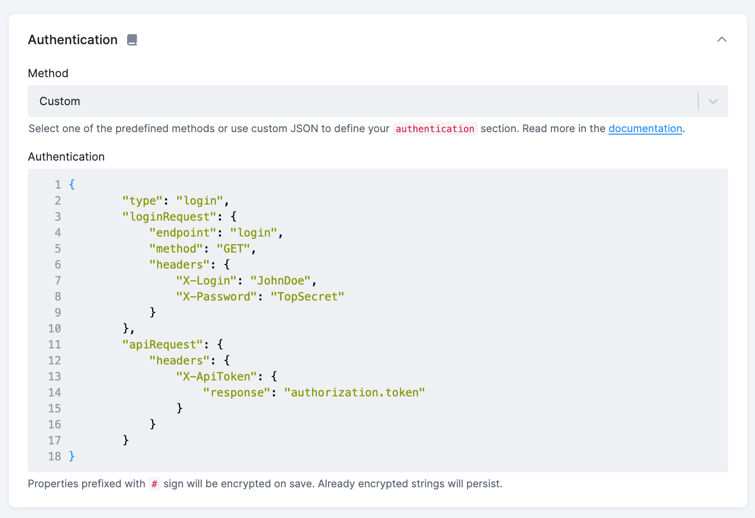
However, this method is reused in the oAuth 2.0 Client Credentials authentication method available in the UI.
## JSON
A sample Login authentication looks like this:
```json
{
"api": {
...,
"authentication": {
"type": "login",
"loginRequest": {
"endpoint": "login",
"method": "GET",
"headers": {
"X-Login": "JohnDoe",
"X-Password": "TopSecret"
}
},
"format": "json",
"apiRequest": {
"headers": {
"X-ApiToken": {
"response": "authorization.token"
}
}
}
}
},
"config": {
...
}
}
```
## Configuration parameters
The following configuration parameters are supported for the `login` type of authentication:
- `loginRequest` (required, object) — a [job-like](https://help.keboola.com/components/extractors/generic-extractor/configuration/config/jobs/) object describing the login request; it has the following properties:
- `endpoint` (required, string) — an API endpoint for the login request; the same rules as for the [Job `endpoint`](https://help.keboola.com/components/extractors/generic-extractor/configuration/config/jobs/#specifying-endpoint) apply here.
- `params` (optional, object) — an object with key-value properties containing request parameters; object keys are parameters names; values are transformed the [same way as in jobs](https://help.keboola.com/components/extractors/generic-extractor/configuration/config/jobs/#request-parameters).
- `method` (optional, string) — an HTTP method to send the request; this defines how the [parameters are sent](https://help.keboola.com/components/extractors/generic-extractor/configuration/config/jobs/#request-parameters) to the API. The default value is `GET`.
- `headers` (optional, object) — an object with key-value properties containing HTTP headers. The names will be used as HTTP header names, and the values will be used as the value of the respective header.
- `format` (optional, string) — defines the expected format of `loginRequest`; the allowed values are `json` (default) and `text`. If the format is text, then it is converted to a json with field `data` (see [example](https://help.keboola.com/components/extractors/generic-extractor/configuration/api/authentication/login/#configuration-with-headers-and-text-response). This conversion will also be applied in case the response is a JSON [scalar](https://help.keboola.com/components/extractors/generic-extractor/tutorial/json/#data-values). But in that case, format `json` has to be used (see [example [EX129]](https://github.com/keboola/generic-extractor/tree/master/doc/examples/129-login-auth-scalar)).
- `apiRequest` (optional, object) — an object which defines how the result of the **login request** will be used in the actual API request; it contains the following properties:
- `headers` (optional, object) — an object with key-value properties containing HTTP headers. The names are header names, the values are paths in the JSON response from which the actual values are extracted.
- `query` (optional, object) — an object with key-value properties containing URL query parameters. The names are parameter names, and the values are paths in the JSON response from which the actual values are extracted.
- `expires` (optional, mixed) — either an integer value specifying a fixed number of seconds after which the **login request** will be sent again (see an [example](https://help.keboola.com/components/extractors/generic-extractor/configuration/api/authentication/login/#expiration-basic)); or, an object with the following properties:
- `response` (required, string) — a path in the JSON response which contains the expiration time. It can be either:
- a string which can be processed by the [`strtotime` function](https://www.php.net/manual/en/function.strtotime.php) (see an [example](https://help.keboola.com/components/extractors/generic-extractor/configuration/api/authentication/login/#expiration-from-response)), or
- a numeric [timestamp](https://en.wikipedia.org/wiki/Unix_time) (with `"relative": false`), or
- a number of seconds for which the credentials are valid (with `"relative": true`).
- `relative` (optional, boolean) — When true, the expiration time is relative to the current time. The default value is `false`.
Note that the values in `apiRequest.headers` and `apiRequest.query` take precedence over the values specified in the
`api.http.defaultOptions.headers` (see an [example](https://help.keboola.com/components/extractors/generic-extractor/configuration/api/authentication/login/#parameter-overriding)). If `expires` is not set, the login request
is called only once before all other requests. To call the login request before every request (e.g., to obtain access token from refresh token), set `"expires": 0`.
## Examples
Below are several examples showing you how to use various login authentication related features in Generic Extractor.
### Configuration with headers
Let's say you have an API which requires every API call to be authorized with the `X-ApiToken` header. The value of that header (an API
token) is obtained by calling the `/login` endpoint with the headers `X-Login` and `X-Password`. The `/login` endpoint response looks
like this:
```json
{
"authorization": {
"token": "a1b2c3d435f6"
}
}
```
The following API configuration deals with the authentication:
```json
"api": {
"baseUrl": "http://example.com",
"authentication": {
"type": "login",
"loginRequest": {
"endpoint": "login",
"method": "GET",
"headers": {
"X-Login": "JohnDoe",
"X-Password": "TopSecret"
}
},
"apiRequest": {
"headers": {
"X-ApiToken": {
"response": "authorization.token"
}
}
}
}
}
```
The first request will be sent to `/login` with the HTTP headers:
X-Login: JohnDoe
X-Password: TopSecret
All consecutive requests will be sent to the endpoints specified in the [`jobs`](https://help.keboola.com/components/extractors/generic-extractor/configuration/config/jobs/) section and
will contain the header:
X-ApiToken: a1b2c3d435f6
See [example [EX079]](https://github.com/keboola/generic-extractor/tree/master/doc/examples/079-login-auth-headers).
### Configuration with headers and text response
Let's say you have an API like the above, but it returns the login response as a plain text:
a1b2c3d435f6
The following API configuration deals with the authentication:
```json
"api": {
"baseUrl": "http://example.com",
"authentication": {
"type": "login",
"loginRequest": {
"endpoint": "login",
"method": "GET",
"headers": {
"X-Login": "JohnDoe",
"X-Password": "TopSecret"
}
},
"format": "text",
"apiRequest": {
"headers": {
"X-ApiToken": {
"response": "data"
}
}
}
}
}
```
The first request will be sent to `/login` with the HTTP headers:
X-Login: JohnDoe
X-Password: TopSecret
The plain text response `a1b2c3d435f6` is converted to the following JSON:
```json
{
"data": "a1b2c3d435f6"
}
```
Therefore you can access it in the headers configuration using the `"response": "data"` reference.
All consecutive requests will be sent to the endpoints specified in the [`jobs`](https://help.keboola.com/components/extractors/generic-extractor/configuration/config/jobs/) section and
will contain the header:
X-ApiToken: a1b2c3d435f6
See [example [EX128]](https://github.com/keboola/generic-extractor/tree/master/doc/examples/128-login-auth-text).
### Configuration with query parameters
Let's say you have an API which requires an [HTTP POST](https://en.wikipedia.org/wiki/POST_(HTTP)) request with `username` and
`password` to the endpoint `/login/form`.
On a successful login, it returns the following response:
```json
{
"authentication": [
{
"secret": "a1b2c3d435f6"
},
{
"token": {
"id": 123
}
}
]
}
```
The actual API requests then must contain the `secretKey` and `tokenId` parameters in the URL.
The following `authentication` configuration takes care of the situation:
```json
"authentication": {
"type": "login",
"loginRequest": {
"endpoint": "login/form",
"method": "FORM",
"params": {
"username": "JohnDoe",
"password": "TopSecret"
}
},
"apiRequest": {
"query": {
"secretKey": {
"response": "authentication.0.secret"
},
"tokenId": {
"response": "authentication.1.token.id"
}
}
}
}
```
The first API request will be sent as:
POST /login/form
username=JohnDoe&password=TopSecret
The [FORM method](https://help.keboola.com/components/extractors/generic-extractor/configuration/config/jobs/#form) sends the parameters
as [application/x-www-form-urlencoded](https://en.wikipedia.org/wiki/POST_(HTTP)#Use_for_submitting_web_forms).
The `apiRequest.query` settings then map the response values to the parameters of the other API calls,
so the second API call will be sent as:
GET /users?secretKey=a1b2c3d435f6&tokenId=123
See [example [EX080]](https://github.com/keboola/generic-extractor/tree/master/doc/examples/080-login-auth-query).
Notice that the example uses completely different URL for the login request.
### Parameter overriding
The above examples show how to use query parameters and headers separately. However, they can be mixed freely; they can also be
mixed with parameters and headers entered elsewhere in the configuration. The following example shows how parameters from
different places are merged together:
Click to expand the example.
```json
{
"parameters": {
"api": {
"baseUrl": "http://example.com/",
"http": {
"defaultOptions": {
"headers": {
"X-Mode": "development",
"X-Account-Id": 123
},
"params": {
"debug": "1",
"orderBy": "default",
"secretKey": "123"
}
}
},
"authentication": {
"type": "login",
"loginRequest": {
"endpoint": "login",
"method": "POST",
"params": {
"username": "JohnDoe",
"password": "TopSecret"
}
},
"apiRequest": {
"query": {
"apiToken": {
"response": "authorization.token"
},
"secretKey": {
"response": "authorization.secretKey"
},
"customerId": {
"response": "authorization.accountId"
}
},
"headers": {
"X-SecretKey": {
"response": "authorization.secretKey"
},
"X-Account-Id": {
"response": "authorization.accountId"
}
}
}
}
},
"config": {
"debug": true,
"outputBucket": "ge-tutorial",
"jobs": [
{
"endpoint": "users",
"params": {
"orderBy": "userName",
"secretKey": "none",
"customerId": "234"
}
}
]
}
}
}
```
The example configuration sends its first request as:
POST /login
{"username":"JohnDoe","password":"TopSecret"}
with this header:
Content-Type: application/json
Notice that in the case of the **login request** both `headers` and `params` from `api.defaultOptions` are ignored. Only the
`headers` and `params` from `api.authentication.loginRequest` are used (and encoded as JSON because of `"method": "POST"`).
The second API call is sent as:
GET /users?debug=1&orderBy=userName&secretKey[0]=none&secretKey[1]=a1b2c3d435f6&customerId[0]=234&customerId[1]=abc&apiToken=987654
with this header:
X-Mode: development
X-Account-Id: abc
X-SecretKey: a1b2c3d435f6
The request URL contains the following query parameters:
- `debug=1` — coming from the `api.http.defaultOptions.params` option
- `orderBy=userName` — coming from the `config.jobs.params` option, which overrides the value specified in `api.http.defaultOptions.params`
- `secretKey[0]=none` — coming from the `config.jobs.params` option, which overrides the value specified in `api.http.defaultOptions.params`
- `secretKey[1]=a1b2c3d435f6` — coming from the `api.authentication.apiRequest.query` option
- `customerId[0]=234` — coming from the `config.jobs.params` option
- `customerId[1]=abc` — coming from the `api.authentication.apiRequest.query` option
- `apiToken=987654` — coming from the `api.authentication.apiRequest.query` option
The request headers contain:
- `X-Mode` — coming from the `api.http.defaultOptions.headers` option
- `X-Account-Id` — coming from the `api.authentication.apiRequest.headers` option, which overrides the values specified in `api.http.defaultOptions.headers`
- `X-SecretKey` — coming from the `api.authentication.apiRequest.headers` option
As you can see, the headers specified elsewhere are **overwritten** by the `api.authentication.apiRequest` while the parameters
specified elsewhere are **merged** with the `api.authentication.apiRequest`.
See [example [EX081]](https://github.com/keboola/generic-extractor/tree/master/doc/examples/081-login-auth-headers-query-override).
### Expiration Basic
It is possible that the credentials provided by the **login request** have a time-limited validity. This is handled by the `expires`
option. If the obtained credentials are always valid for a certain period of time, for example for 1 hour, modify the [first
example](https://help.keboola.com/components/extractors/generic-extractor/configuration/api/authentication/login/#configuration-with-headers) to this:
```json
{
"parameters": {
"api": {
"baseUrl": "http://example.com/",
"authentication": {
"type": "login",
"loginRequest": {
"endpoint": "login",
"method": "GET",
"headers": {
"X-Login": "JohnDoe",
"X-Password": "TopSecret"
}
},
"apiRequest": {
"headers": {
"X-ApiToken": {
"response": "authorization.token"
}
}
},
"expires": "3600"
}
}
}
}
```
This causes Generic Extractor to call the **login request** every hour.
See [example [EX082]](https://github.com/keboola/generic-extractor/tree/master/doc/examples/082-login-auth-expires).
### Expiration from response
In case the credentials provided by the **login request** have a time-limited validity, use the `expires` option.
If the validity of the credentials is returned in the response, modify the [first example](https://help.keboola.com/components/extractors/generic-extractor/configuration/api/authentication/login/#configuration-with-headers) to this:
```json
{
"parameters": {
"api": {
"baseUrl": "http://example.com/",
"authentication": {
"type": "login",
"loginRequest": {
"endpoint": "login",
"method": "GET",
"headers": {
"X-Login": "JohnDoe",
"X-Password": "TopSecret"
}
},
"apiRequest": {
"headers": {
"X-ApiToken": {
"response": "authorization.token"
}
}
},
"expires": {
"response": "authorization.expires"
}
}
}
}
}
```
This assumes that the response of the **login request** looks like this:
```json
{
"authorization": {
"token": "a1b2c3d435f6",
"expires": "2017-02-20 12:34:45"
}
}
```
See [example [EX083]](https://github.com/keboola/generic-extractor/tree/master/doc/examples/083-login-auth-expires-date).
### Relative expiration from response
In case the API returns credentials validity in the **login request** and that validity is expressed in seconds,
use the `expires` option together with setting `relative` to `true`.
The result is the behavior of the [first example](https://help.keboola.com/components/extractors/generic-extractor/configuration/api/authentication/login/#expiration-basic) but the value is taken
from the response as in the [second example](https://help.keboola.com/components/extractors/generic-extractor/configuration/api/authentication/login/#expiration-from-response).
```json
{
"parameters": {
"api": {
"baseUrl": "http://example.com/",
"authentication": {
"type": "login",
"loginRequest": {
"endpoint": "login",
"method": "GET",
"headers": {
"X-Login": "JohnDoe",
"X-Password": "TopSecret"
}
},
"apiRequest": {
"headers": {
"X-ApiToken": {
"response": "authorization.token"
}
}
},
"expires": {
"response": "authorization.expires",
"relative": true
}
}
}
}
}
```
This assumes that the response of the **login request** looks like this:
```json
{
"authorization": {
"token": "a1b2c3d435f6",
"expires": 3600
}
}
```
See [example [EX084]](https://github.com/keboola/generic-extractor/tree/master/doc/examples/084-login-auth-expires-seconds).
### Login authentication with functions
Suppose you have an API which requires you to send a username and password separated by a colon and
base64 encoded — for example, `JohnDoe:TopSecret` (base64 encoded to `Sm9obkRvZTpUb3BTZWNyZXQ=`) in the
`X-Authorization` header to an `/auth` endpoint. The login endpoint then returns a token
which can be used with other API calls.
The following configuration reads both the login and password parameters from the
[`config` section](https://help.keboola.com/components/extractors/generic-extractor/functions/#configuration-attributes) and
uses the `login` authorization method to send them to the special `/auth` endpoint.
```json
{
"parameters": {
"api": {
"baseUrl": "http://example.com/",
"authentication": {
"type": "login",
"loginRequest": {
"endpoint": "auth",
"headers": {
"X-Authorization": {
"function": "base64_encode",
"args": [
{
"function": "concat",
"args": [
{
"attr": "#login"
},
":",
{
"attr": "#password"
}
]
}
]
}
}
},
"apiRequest": {
"headers": {
"X-Api-Token": "token"
}
}
}
},
"config": {
"#login": "JohnDoe",
"#password": "TopSecret",
"debug": true,
"outputBucket": "mock-server",
"jobs": [
{
"endpoint": "users",
"dataType": "users"
}
]
}
}
}
```
See [example [EX100]](https://github.com/keboola/generic-extractor/tree/master/doc/examples/100-function-login-headers).
### Login authentication with login and API request
Suppose you have an API similar to the one in the [previous example](https://help.keboola.com/components/extractors/generic-extractor/configuration/api/authentication/login/#login-authentication-with-functions).
It requires you to send a username and password separated by a colon and
base64 encoded — for example, `JohnDoe:TopSecret` (base64 encoded to `Sm9obkRvZTpUb3BTZWNyZXQ=`) in the
`X-Authorization` header to an `/auth` endpoint. The difference is that the login endpoint returns a token
which must be further processed. The other API requests expects that the received token is concatenated again
with the user name — for example, `JohnDoe:d868d581b2f` and an SHA1 hash is generated (e.g.
`09e4e6977b72ecc9fa2120f49a4a74f5c268d277`). This value must be sent as an `auth` query parameter.
The `loginRequest` part of the following configuration is the same as in the
[previous example](https://help.keboola.com/components/extractors/generic-extractor/configuration/api/authentication/login/#login-authentication-with-functions) — it reads both the login and password parameters
from the `config` section and uses the `login` authorization method to send them to the special `/auth` endpoint.
The `apiRequest` part of the configuration uses the [`sha1`](https://help.keboola.com/components/extractors/generic-extractor/functions/#sha1) function on
the result of the [`concat`](https://help.keboola.com/components/extractors/generic-extractor/functions/#concat) function. The `concat` function takes
the login parameter from the [`config` section](https://help.keboola.com/components/extractors/generic-extractor/functions/#configuration-attributes)
(via `"attr": "#login"` reference) and the token parameter from the
[response of the login request](https://help.keboola.com/components/extractors/generic-extractor/functions/#login-authentication-context)
(via `"response": "authorization.token"` reference).
```json
{
"parameters": {
"api": {
"baseUrl": "http://example.com/",
"authentication": {
"type": "login",
"loginRequest": {
"endpoint": "auth",
"headers": {
"X-Authorization": {
"function": "base64_encode",
"args": [
{
"function": "concat",
"args": [
{
"attr": "#login"
},
":",
{
"attr": "#password"
}
]
}
]
}
}
},
"apiRequest": {
"query": {
"auth": {
"function": "sha1",
"args": [
{
"function": "concat",
"args": [
{
"attr": "#login"
},
":",
{
"response": "authorization.token"
}
]
}
]
}
}
}
}
},
"config": {
"#login": "JohnDoe",
"#password": "TopSecret",
"debug": true,
"outputBucket": "mock-server",
"jobs": [
{
"endpoint": "users",
"dataType": "users"
}
]
}
}
}
```
See [example [EX117]](https://github.com/keboola/generic-extractor/tree/master/doc/examples/117-function-login-params-response)
or [example [EX118]](https://github.com/keboola/generic-extractor/tree/master/doc/examples/118-function-login-headers-response), which uses headers.